Today’s Best Smartphones (February 2012)


Since this article was first written, an updated version has been posted here. Check it out. A lot has changed.

When it comes to overall specs, it's hard to beat Samsung's Galaxy Series

And the Winners Are…

Back in December I created a chart of the top smartphones available at the time. Since then, a lot has happened, so I’ve updated my list. Here are the top five smartphones available today:


HTC Rezound

LG Nitro HD

Motorola Droid RAZR Maxx

Samsung Galaxy Nexus

Samsung Galaxy Note

Processor

1.5 GHz dual-core

1.5 GHz dual-core

1.2 GHz dual-core

1.2 GHz dual-core

1.5 GHz dual-core

RAM

1GB

1GB

1GB

1GB

1GB

Storage

16GB

16+4GB

16+16GB

32GB

TBD

Screen size

4.3”

4.5”

4.3”

4.65”

5.3”

Resolution

1280×720

1280×720

960×540

1280×720

1280×800

Pixel density

342 ppi

 329 ppi

256 ppi

316 ppi

285 ppi

Rear cam

8MP

8MP

8MP

5MP

8MP

Front cam

2MP

1.3MP

1.3MP

1.3MP

2MP

Network

LTE

LTE

LTE

LTE

LTE

5GHz Wi-Fi

No

No

No

Yes

Yes

Bluetooth

3.0

3.0

4.0

3.0

3.0

NFC

No

No

No

Yes

Yes

Thickness

 13.65mm

10.4mm

8.99mm

9.47mm

9.65mm

Weight

164g

128g

145g

150g

178g

Battery

 1620 mAh

1830 mAh

3300 mAh

1850 mAh

2500 mAh

OS

Android 2.3.4

Android 2.3.5

Android 2.3.5

Android 4.0.2

Android 2.3.5

Carrier

Verizon

AT&T

Verizon

Verizon

AT&T

    Comments

  • Although the Rezound is the thickest phone here, it has the highest pixel density, and a very fast processor. For now, it stays on the ‘best’ list.
  • You could argue the Droid RAZR belongs in the above chart because it’s thinner and lighter than the RAZR Maxx, but battery life is such an important issue on LTE phones. The RAZR Maxx’s 3300mAh battery has 85% more current than the 1780mAh battery in the original RAZR. Even with the extended battery, the RAZR Maxx is still the thinnest phone in the above chart.
  • Sprint will be releasing a Galaxy Nexus in the first half of this year that is rumored to have a 1.5GHz dual-core CPU, 2100mAh extended battery and a functioning Google Wallet. The original Galaxy Nexus is capable of supporting NFC, but Verizon blocks users from downloading the Google Wallet. Smart users know of a trick which allows Verizon users to download and install Google Wallet from the Android Market.
  • Although the Galaxy Note became available in Europe last year, it’s rumored to go on sale here in the U.S. on February 19th.
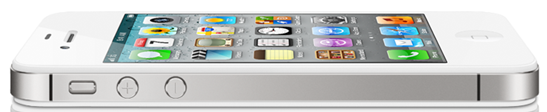
Although iPhone 4 sales are better than ever, it no longer competes when it comes to most specs.

Close, But No Cigar

You may have noticed that some phones which were included in my December list, have fallen by the wayside. This includes the iPhone 4S and several other phones which are still good, but no longer compare with the best phones. Each has at least one major flaw.


Apple iPhone 4S

HTC Vivid

Motorola Droid RAZR

Motorola Droid 4

Samsung Galaxy S II Skyrocket

Processor

800MHz dual-core

1.2 GHz dual-core

1.2 GHz dual-core

1.2 GHz dual-core

1.5 GHz dual-core

RAM

512MB

1GB

1GB

1GB

1GB

Storage

16GB, 32GB, 64GB

16GB

16+16GB

16GB

16GB

Screen size

3.5”

4.5”

4.3”

4.0”

4.5”

Resolution

960×640

960×540

960×540

960×540

800×480

Pixel density

326 ppi

245 ppi

256 ppi

275 ppi

207 ppi

Rear cam

8MP

8MP

8MP

8MP

8MP

Front cam

0.3MP

1.3MP

1.3MP

1.3MP

2MP

Network

HSPA

LTE/HSPA+

LTE

LTE

LTE/HSPA+

5GHz Wi-Fi

No

No

No

No

Yes

Bluetooth

4.0

3.0

4.0

4.0

3.0

NFC

No

No

No

No

Yes

Thickness

9.3mm

11.2mm

7.1mm

12.99mm

9.40mm

Weight

140g

177g

127g

179g

132g

Battery

1420 mAh

1620 mAh

1780 mAh

1785 mAh

1850 mAh

OS

iOS 5.0

Android 2.3.5

Android 2.3.5

Android 2.3.5

Android 2.3.4

Carrier(s)

AT&T, Verizon, Sprint

AT&T

Verizon

Verizon 2/10

AT&T

    Comments

  • You could argue the Droid RAZR belongs in the first list because it’s thinner and lighter than the Maxx, but battery life is such an important issue with LTE phones that I favored the RAZR Maxx over the older Droid. It’s 3300mAh battery has 85% more current than the battery in the original Droid Razr.
  • I debated whether the soon to be released Droid 4 belonged in the first chart, but it’s lacking a HD screen and it is one the thickest and heaviest of all of these phones. If you’ve just got to have a real keyboard, you might be willing to overlook these problems.
  • I also debated whether the Galaxy S II Skyrocket belonged in the first chart, because it has such a fast processor. I left it out because it has the worst screen of any of the phones here.
  • Windows Phone fans might ask why the Titan isn’t in this chart, because it has a 1.5GHz processor and a 4.7″ screen. I left it out because it doesn’t have a HD screen and the Titan II is just around the corner..
  • Why The iPhone 4S Is No Longer One of The Best

    Some of you are probably wondering why the iPhone 4S is no longer listed in the chart of best smartphones. The answer is easy: The iPhone 4S hasn’t been competitive for a while. It has an under-clocked processor that runs at almost half the speed of the best Android phones. While it’s true the iPhone does well in some graphics-related benchmarks, the fastest Android phones kill it in side-by-side real world speed tests. If you want to see just how much faster the Droid RAZR is than the iPhone 4S, watch this video.The iPhone also doesn’t have a 720p HD display, and believe it or not, it’s not a real 4G phone. That means its data speeds are 5-10x slower than most 4G LTE phones. If you’re a hard-core Apple fan, you’ll probably buy the iPhone 4S anyway, and that’s O.K — just don’t say you weren’t warned. Two years is a long time to own a non-4G phone.

    Several new quad-core phones will be demonstrated in Spain next month. As soon as new phones are released, I’ll update this chart.

    If you think I missed a phone that should be considered, please let me know.

    – Rick

    Copyright 2012 Rick Schwartz. All rights reserved. Linking to this article is encouraged.
Optimizing Your Network for Multimedia Streaming

Last updated: January 5, 2014

This article has had almost 20,000 views. Thanks for reading it.

How to Optimize Your Home Network for Multimedia Streaming

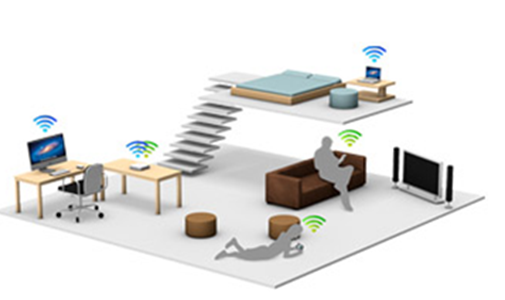
Wireless devices can be found many places in a typical home


Wireless networks can be found in almost every home and office. Setting up a Wi-Fi network for normal use is easy. But when you try to stream high-quality video, you’re likely to experience occasional stuttering or rebuffering. According to a study, almost one in five U.S. Internet users are unable to stream 720p HD video reliably. In some states, 40% of consumers cannot do this. When problems like this occur, you can do several things to improve the situation:

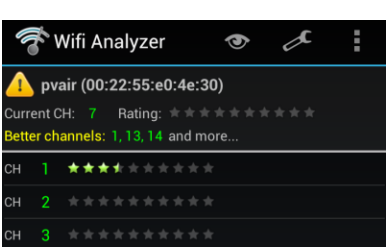
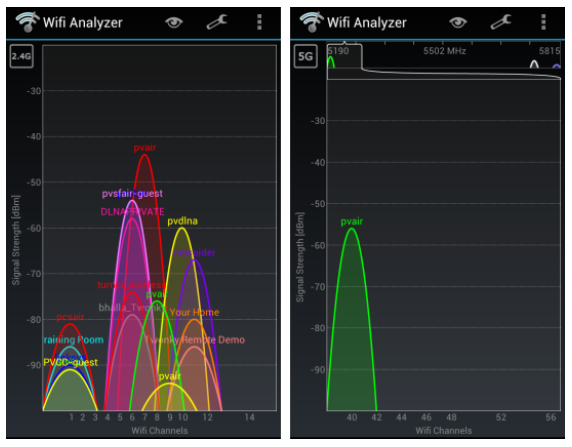
  1. Use an uncrowded channel – Make sure you’re not sharing the same Wi-Fi channel with others close to you. Many 2.4GHz wireless access-points default to the same channel when they are powered up. This can make congestion worse and lower your throughput. Download software like Farproc’s free Wifi Analyzer to get a visual picture of your network. It even tells you which are the best channels to use. Most routers will allow you to set the channel using your web browser.
  2. Utilities like this one tell you which wireless channels to use.

  3. Avoid overlapping channels – Use the channels 1, 6, or 11 when possible, because they are non-overlapping.
  4. Upgrade for more speed – If you have an 802.11b or 802.11g wireless router, consider upgrading to an 802.11n or 802.11ac router. Both are capable of faster data speeds and also support the less crowded 5GHz band. Some 802.11ac routers are capable of speeds over 1Gbps.
  5. The 2.4GHz band is much more crowded than the 5GHz band

  6. Use the 5GHz band if your devices support it – The 5GHz band is faster and not as susceptible to interference from cordless telephones, microwave ovens, baby monitors, Bluetooth devices and wireless keyboards as the 2.4GHz band. It’s also much less crowded and should be used as long as your devices support it, and you are not too far away from your wireless access point.
  7. A low-cost Wi-Fi Booster

    A low-cost Wi-Fi Booster

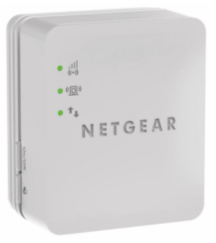
  8. Extend your range – If your problem is signal strength-related, consider using a Wi-Fi booster/repeater or wireless access point with better antennas like this one. By adding the $40 Wi-Fi booster shown on the right, I was able to increase my download speeds by almost 400%. An even better option for those who have a wired Ethernet network is to purchase a second router that supports 802.11ac. Make sure to set it up as an access point where you connect the first router to the port 1 and NOT the WAP port. Also make sure to disable the DHCP server. More details here.
  9. Consider wireless alternatives – When you’re having problems steaming HD video, you may want to consider wireless alternatives like HomePlug Powerline AV adapters. If you go this route, make sure your adapter is HomePlug AV-compatible so you can mix and match devices from other companies. According a recent article in Maximum PC, last-generation Homeplug AV 200 adapters were supposed to be capable of speeds of up to 200Mb/s. Even though they only got real world speeds were 60-70Mb/s, that’s enough for a single HD stream. Newer devices support the IEEE 1903 standard which is capable of theoretical speeds up to 500Mbps and real world speeds up to 100Mbps. These speeds are even faster than you can get over standard Ethernet wiring, so you should be able to stream multiple HD movies at once in your home using multiple adapters. Consider the TP-Link AV-500 TL-PA511KIT or eNetgear Nano 500 XAVB5101 adapters. Those are two of the best affordable adapters available today. Both should be capable of real world read speeds of over 62Mbps and real world write speeds over 54Mbps.

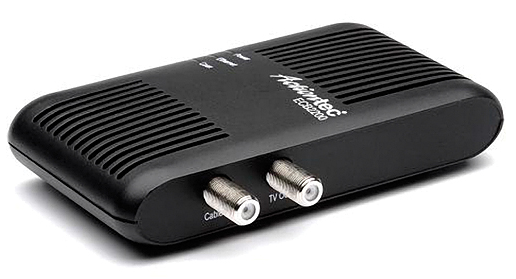
    Another good wireless alternative are MoCA adapters, which transmit multimedia data over coax cable. Both of these are capable of higher data rates and more reliable than most wireless routers.

  10. Test your download speed – If you stream media over the Internet, you should know what your download speed is. Even more important than the peak speed is the average speed. Watch whether the data rate is consistent, or fluctuates a lot. There are several good sites and apps which do this. More info.

An Ethernet Over Coax MoCA Network Adapter

Dual-Band Wi-Fi FAQ

Do all 802.11g/n products support dual-band?
No. 802.11ac was designed specifically for the 5GHz band, however, so it seems likely all ‘ac’ products will support 5GHz.

Who makes dual-band routers?
Most wireless routers sold over the past few years support dual-band. Examples include: Apple’s Airport Express, all ASUS routers (RT-AC66U, RT-N65U, RT-N66U and EA-N66) the Linksys N600, N750, N900 and AC1750 as well as routers from Netgear.

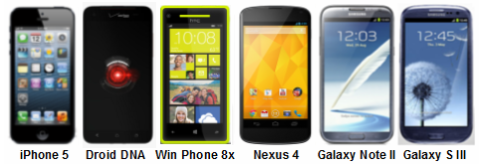
Here are just a few of the smartphones with 5GHz Wi-Fi support

Here are just a few of the smartphones with 5GHz Wi-Fi support

Do you have a list of mobile devices that support 5GHz Wi-Fi?
Here are a few of the devices which support dual-band Wi-Fi. Note: This list is not current. These days most mobile devices support 5GHz.

  • Amazon Kindle Fire HD
  • Amazon Kindle Fire HDX
  • Apple AirPort Extreme (2009 and later)
  • Apple computers with Wireless-N support
  • Apple iPad
  • Apple iPad 2
  • Apple iPad 3
  • Apple iPad 4
  • Apple iPhone 5 (and later)
  • Apple TV (2nd and 3rd gen.)
  • ASUS Nexus 7
  • BlackBerry PlayBook
  • Google Nexus 10
  • HTC Droid DNA
  • HTC Rezound
  • HTC Windows Phone 8x
  • LG Nexus 4
  • LG Nexus 5
  • Linksys EA-3500 wireless router
  • Linksys E-4200 wireless router
  • Linksys EA-4500 wireless router
  • Microsoft Surface RT
  • PCs with Wireless-N support (most, not all)
  • Samsung Galaxy Premier
  • Samsung Galaxy Nexus
  • Samsung Galaxy Note 10.1
  • Samsung Galaxy Note II
  • Samsung Galaxy Tab 3 8
  • Samsung Galaxy Note 3 (and later models)
  • Samsung Galaxy S II
  • Samsung Galaxy S II Skyrocket
  • Samsung Galaxy S III (and later models)
  • Samsung Galaxy S III mini
  • Samsung Galaxy S 4
  • Samsung Galaxy Tab 10.1 (possibly other sizes as well, but NOT the Galaxy Tab 2)
  • Samsung Nexus 10
  • Slingbox 500

Where can I go to find out if my devices supports Dual-band Wi-Fi?
Search for your device here. It’s dual-band if there is a “1” under 5.0 GHz transmit and receive.

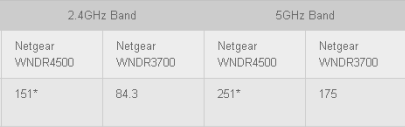
Is 5GHz Wi-Fi faster than 2.4GHz Wi-Fi?
It you refer to the chart below, you’ll see some routers are capable of higher data rates when using the 5GHz band. More info.

Chart courtesy of Maximum PC

Is there a downside when using 5GHz Wi-Fi?
Yes. Not all devices support 5GHz Wi-Fi. Also, the higher frequency signals of 5GHz networks do not penetrate walls as well as 2.4GHz signals. This limits their reach inside some homes.

How can you force your devices to use 5GHz Wi-Fi?
‘Forget’ the 2.4GHz network and connect to the 5GHz one.

What’s better than 802.11n?
802.11ac is a new wireless-networking standard which is capable of speeds that are almost 3x faster than 802.11n. You can learn here about it here. In addition to higher throughput, 802.11ac has wider coverage and improved power efficiency. Although real-world speeds won’t always exceed 1Gbps, 802.11ac should be capable of speeds of 500Mbps at distances of 50 meters. Apple’s Macs now include support for 802.11ac. All premium routers now include 802.11ac support as well. Asus shipped a laptop with support for 802.11ac over a year ago.

Is anything else being done to improve streaming of multimedia around the house?
Yes, companies like Qualcomm are working on technology called StreamBoost. When combined with 802.11ac, this is supposed to improve performance by managing network traffic. StreamBoost-compatible products let users to see all the devices connected to their network and monitor the real-time bandwidth usage of every device.

What comes after 802.11ac?
According to this blog, “802.11ad improves upon the wireless capabilities introduced in 802.11n. Ideally, 802.11ad will allow devices to communicate over four, 2.16GHz-wide channels, delivering data rates of up to 7 Gigabits per second, even for mobile devices with limited power, a significant improvement over both 11n and 11ac.” More info about 802.11ad.

There are also people who say G.hn is the next big thing in home networking. It uses existing home wiring including coaxial cables, phone lines and power lines. You can learn here about it here.

More about what lies next in networking.

Another good article related to this topic.

If you follow the above guidelines, you should be able to stream high-definition videos without problems. Let me know if I missed any good Wi-Fi tips.

– Rick

Copyright 2013-2014 Rick Schwartz. All rights reserved. Linking to this article is encouraged. Network photo courtesy of Apple.


Follow me on Twitter @mostlytech1

iOS 5.0’s Advantages over Android 4.0

This article was just updated! You can view the new version here. It compares iOS 6 to Android 4.1.

Android has come a long way, but iOS is very mature and still has quite a few advantages over Android. Yesterday I listed the things I like better about Android 4.0 OS. Here are the things I miss most from iOS 5.0 and the Apple mobile ecosystem.

  1. Better overall app quality – Android apps have improved, but still don’t match the App Store when it comes to overall app quality. Apple tests all apps and it shows. Apple also excels in categories like games.
  1. Few tablet-optimized apps – Andy Rubin once said he didn’t think there should be apps specific to a tablet. I don’t agree with this statement. While it’s true, a well-designed app should adapt to different screen sizes, iPad-optimized apps provide a much better experience than standard iPhone apps. I wish the Android Market had a filter for tablet-optimized apps.
  1. More iOS-only or iOS first apps – By now you’d think all popular apps would be available on both platforms, but that’s not the case. Android is still missing some popular iOS apps. To make things worse, even when developers support both platforms, they often release their iOS apps first. If I were Google, I would provide incentives to top app developers to make sure they release their popular apps at the same time on both platforms.
  1. iCloud – Google had a huge lead in the area of cloud-based apps, but they still haven’t put together a comprehensive solution like Apple has with iCloud. Sure you could create an iCloud-like solution, but you’d have to do with a collection of apps. Apple makes it easier.
  1. Better intelligent personal assistant – I’ve tried Iris and a few other Siri competitors on Android and they don’t compete with Siri yet. It’s ironic that Google let Apple win in this area, because they still have better cloud-based voice recognition and return more useful search results in general.
  1. Better cut and paste – Apple has done a better job implementing their cut and paste. The also have more region selection options. This is one of the things I miss the most.
  1. Better calendar app – Another thing I miss is the iOS calendar. I found it much easier to add appointments to the Apple Calendar than the Android Calendar.
  1. No carrier bloatware – Carriers load all non-Nexus Android phones with useless apps. Some of these are links to paid services, others are carrier-branded apps. Most are things you don’t need and will never use. They clutter your screens and can’t be removed.
  1. Less OS fragmentation – Carriers decide which versions of the Android OS to include. Oftentimes they do not allow users to upgrade to the newest OS. This combined with carrier skins makes the Android experience vary from phone to phone. Although Apple does have some problems with fragmentation of older phones (e.g. iPhone 3G), it’s not near as bad as most Android phones.
  1. Better voice mail app – I think it’s ridiculous that I have to dial *86 to get voice-mail on my Galaxy Nexus. You’d think its 1998, not 2012. Apple’s phone app has dedicated voice mail button and its interface is excellent.
  1. Better power management – iOS devices seem to have power management than Android devices. Some of this may be a result of the fact that iOS doesn’t allow third-party apps to run in the background. Others might have to do with the fact that iPhone 4S has an under-clocked processor and no LTE support. Whatever the reason, it’s an Apple advantage.
  1. One-button operation – Apple uses a single button to return to the Home screen, display the search box, and show recently opened apps. Is it intuitive? No, but once you learn it, it works well.

These are the things that I miss about iOS. What did I leave out?

This article was just updated! You can view the new version here. It compares iOS 6 to Android 4.1.

– Rick

Copyright 2012 Rick Schwartz. All rights reserved. Linking to this article is encouraged.
Follow me on Twitter @mostlytech1

Android 4.0’s Advantages over iOS 5.1

This article was just updated! You can view the new version here. It compares Android 4.1 to iOS 6.

I recently switched from an iPhone to an Android phone and was surprised how easy the transition was. That says a lot about how far Android has come over the past year. While everything is still fresh in my mind, I want to talk about the strengths of each operating system (OS). I’ll start with Android 4.0, and then list the advantages iOS has over Android.

Extensive Customization Options

There are so many different ways you can customize an Android phone that it would be almost impossible to list them all here. Here are a few of the ways you can customize your Home screen(s).

    Widgets are one of the ways Android users can customize their mobile devices

  1. Widgets – Widgets can be placed on any of the five Android home screens and provide you with things like weather updates, stock quotes, recent e-mails, or your daily calendar. Widgets are accessible, always visible and updated in real-time without needing to launch an app. Widgets also provide easy access to both system and application settings. Want to disable Wi-Fi or GPS services? Use a widget. You can get widget-like apps for the iPhone, but they can only run on your lock screen, and some require a jail-broken phone or third-party widget executor software.
  2. Easier screen organization – It’s much easier to rearrange the home screen locations of your apps on an Android phone. If you’ve ever tried to move an app several screens on an iPhone without rearranging the existing apps, then you know what I mean. It’s almost impossible to do.
  3. Moving wallpapers – Live wallpapers are pre-installed on all Android 4.0 devices. They allow you to run cool animations on every home screen, without rooting your phone, or needing to use a third-party app.

Superior Navigation Services

All Android devices have navigation services which are far superior to those found on the iPhone. There are two main reason for this:

    Turn-by-turn directions are another Android advantage

  1. More accurate GPS – The GPS on the iPhone is often inaccurate when you’re in a large city, or at an event with many people. Sometimes it shows your location hundreds of feet from where you are — even when there are only a few mobile devices in the area. My Android phone uses a compass, Wi-Fi, a barometer (for altitude) and other techniques to improve its GPS accuracy. The difference in GPS accuracy between it and an iPhone is dramatic.
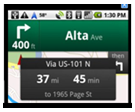
  2. Turn-by-turn directions – The Google Maps app is much better on Android than iOS devices. Its turn-by-turn directions are far superior to any free navigation app you can find for iPhone. It’s even better than paid services like Verizon’s VZ Navigator and most automotive GPS systems. Google Maps also has other important features you won’t find on other maps including offline maps, transit maps, walking directions, Street view and indoor maps.

Classic Android Advantages

You’ve probably heard most of these advantages before. They’re all still true.

  1. System Intents – It’s easiest to explain this by contrasting a iOS app with an Android app. When I click Share on my free Android “Notes Lite” app I have 15 choices including the ability to share via Dropbox, Bluetooth, Email, Facebook, Gmail, Google+, Text Message, Twitter, WordPress Blog, and six more options. [The actual list of intents varies depending on which apps you have installed.] When I click Share and Print on my $10 Apple “Pages” word processor app I’m given five sharing choices: Email, iWork, iTunes (useless), iDisk and WebDAV (useless). Google realizes they cannot be best at everything and allows their customers to choose which services they would like to use. Almost all Android apps support this feature.
  2. Flash support – The lack of Flash support is probably the best-known iOS limitation. I can’t tell you how many times someone has sent me a link to a video I couldn’t watch on the iPhone or iPad because it was Flash. Android users don’t have to worry about this.
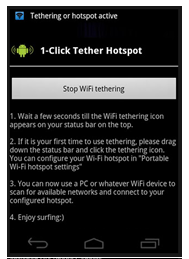
  3. One of the many free Wi-Fi tethering apps in the Android Market

  4. Better free Wi-Fi tethering – There are several good free Wi-Fi Tethering apps in the Android Market which don’t require you to root your phone. These apps allow Android users to share their network connections with their computers and tablets. This advantage can save you about $20 a month. Tethering is possible on iOS devices only after you jail-break your phone and download a paid app from a third-party app store.
  5. True multitasking – Apple places restrictions on background operation for third-party apps. In most cases, they are suspended and not allowed to communicate with other apps. Android has no such restrictions and supports true-multitasking. This has changed the way I use my phone, and allows me to do things which weren’t possible on an iPhone.
  6. 3rd-Party App Stores – There are quite a few good alternative app stores for Android users including: AppBrain, GetJar, Handango, Handmark, and the Amazon App Store, which offers one paid app a day for free. The only apps which can be installed outside the Apple app store are called Cydia apps. Cydia is only available for jailbroken devices.
  7. No need to sync media – It’s a hassle to get anything but photos on or off of an iOS device. With Android devices you just connect a USB cable to your computer and drag and drop your files. There’s no need to use iTunes (or other apps) to sync files.
  8. More advanced notifications – Although notifications have improved in iOS 5.1, Android still has advantages in this area. For example, you can tell at a glance what types of notifications have occurred, and clear all with a single click.
  9. Easier to root/jailbreak – In most cases it’s easier to root an Android mobile device than it is to jailbreak an Apple mobile device. One reason for this is because Apple has devoted significant resources to prevent jailbreaking and prevent jalibreaking apps from appearing in the App Store. Some of the most popular apps in the Android Market only work on rooted devices.
  10. Easier access to app settings – Android users can either use an in-app Menu button, or onscreen widgets to manage apps settings. iPhone users must use the Settings app every time they want to change app settings, or turn off Bluetooth.
  11.  A more open marketplace – The Android Market has far less restrictions than the App store. There is a long list of apps Apple won’t allow, including apps which compete with iTunes, free Wi-Fi tethering apps, VoIP apps which use technologies like Google Talk, and great utilizes like Farproc’s Wi-Fi Analyzer.
  12. More screen unlock options – Android now has five different ways to unlock your screen: A slider which lets you access the home screen or camera, pattern unlock, PIN unlock, password unlock and a flashy new Face unlock, which unlocks the screen when you hold the phone up to your face.
  13. Back button – Android’s Back button can be very useful on some apps and sites. For some strange reason, the iOS home screen (and many iOS apps) doesn’t allow you to go back.

Other Important Android Advantages

Android 4.0 has other important advantages over iOS 5.1. You probably haven’t heard of these before, but they are very important to me.

  1. More Stable – Apps Crash Less – One of the first things I noticed when I switched to Android, is that apps like the browser crash much less. Apparently I’m not the only one who has experienced this. A recent study published in Forbes magazine, shows this to be true.
  2. Better Wi-Fi to cellular switching – My iPhone had so many problems switching from Wi-Fi to 3G, that I had to turn off Wi-Fi much of the time. Once my phone saw a wireless access point it recognized, it would try to connect even when the signal was poor and data transfer rates were slow.
  3. Apple makes some tablet users choose between distorted text or apps which don't occupy the entire screen.

  4. More Tablet-friendly – There is no need to push a 2x button to run older Android apps on a tablet. Older apps stretch to fill the larger screen without the types of distortion you see when you use the 2x mode on an iPad.
  5. A Better Web browser – I’ve tried all of the best iOS browsers (Dolphin, Opera, Atomic Web, etc.) and none of them beats Chrome running on Android 4.0. See for yourself. On Android you can also set an alternative browser as your default. This is not possible with iOS.
  6. Better app updating – My iOS devices sometimes only show available updates after I launch the App Store app or iTunes on my computer. And every time I update an app I’m asked to enter my password. Android doesn’t have either of these issues.
  7. Better Facebook App – I was very surprised to find that ‘Facebook for Android’ is now better than ‘Facebook for iOS.’ ‘Facebook for Android’ doesn’t lose its place when you go back after reading a post. It also doesn’t crash when you try to browse a lot of posts.
  8. Easier Exchange setup – I was also surprised that it was easier to setup access to my corporate e-mail account on an Android phone than it was on my iPhone. All I had to do was enter my e-mail and password and my contacts and calendars were synced with my Android phone. Apple needed to know my companies server name, domain name and username — in addition to my e-mail and password.
  9. Better in-line spell checker – Apple’s infamous spell checker has spawned many spell check parody sites like this one. The Android in-line spell checker and suggestion modes work better than Apple’s. I like the way it provides four suggestions, and doesn’t try to auto-insert as many words. It also has a mic button on the keyboard, which makes it easier to speak your words. The iPhone’s onscreen keyboard used to be superior, but with Android 4.0 the difference is much smaller.
  10. Better voice searches – Android has better voice recognition and more relevant search results than Siri. Don’t believe me? Ask Apple co-founder Steve Wozniak. You can read more about his thoughts about the accuracy of Siri here.

Parting Thoughts

Before anyone gets too excited about any of this, I’d like to say that my comments above are my personal observations. This isn’t intended to be a comprehensive list. I know I’ve left a few important things out like NFC. My comments are based on my observations over six months of usage. I use iOS 5.1 and Android 4.0 every single day and view them as equal in many ways. If it seems like I’m stressing Android’s advantages over iOS, it’s because most people think the iPhone is still far ahead of Android and that is no longer true. Even in the area of mobile UI design, Android 4.0 is now beating iOS in some areas. Case in point: Android 4.0 was just awarded best platform experience by Parsons School of Design. More info.

Tomorrow I’ll try to be equally passionate about iOS’ advantages over Android. Check back and see how I did.

This article was just updated! You can view the new version here. It compares Android 4.1 to iOS 6.

– Rick

Copyright 2012 Rick Schwartz. All rights reserved. Linking to this article is encouraged.
Jumping Ship – Moving from iOS to Android

I Was an iPhone Addict

I’ve been a hardcore iPhone user for the past several years. Like most iPhone users, I had a hard time imagining ever switching to another phone. I’d seen some early Android phones and their user interface didn’t look nearly as polished as iOS. I also thought the transition would be too hard and I might regret making the switch. I knew my iPhone so well I could practically operate it blindfolded.

Why Would Anyone Defect?

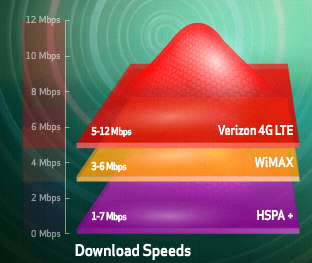
I had planned to buy an iPhone 5 the first day it was available. However, once the iPhone 4S was announced, and it became clear an iPhone 5 was not going to be released in 2011, I started having second thoughts. My old iPhone had slowed down to the point it was sometimes frustrating to use. I’m not sure if this was a result of iOS, or the fact I was on the AT&T network, which is horrible where I live. While I was researching this problem, I learned about the differences between 4G LTE and the 4G imposters like HSPA+. 4G LTE phones are 5 to 12 times faster than other phones. Two things were clear to me:

  1. My next phone must support LTE
  2. My next phone must run on the Verizon network

More about the confusion around 4G data speeds can be found here.

Verizon's LTE speed comparison

These two requirements made my decision easier. The iPhone 4S had disappointing specs (compared to the newest Android phones) and it did not support LTE. There was no way I was going to sign another two-year contract on a non-LTE phone.

So, I started looking into Android phones. I’d heard about the Samsung Galaxy Nexus and read several reviews which said it was the best Android phone ever. Some of the reviews said Android 4.0 was more intuitive than earlier versions, and even had the nerve to compare it to iOS. So I took a big leap of faith and bought a Samsung Galaxy Nexus the first day they became available. I wasn’t too worried, because I had two weeks to return the phone if I didn’t like it.

More about the differences between iPhone 4S and the Galaxy Nexus can be found here.

I immediately started using my new Galaxy Nexus and was surprised the transition wasn’t as difficult as I thought it would be. Once I installed a few of my favorite apps, I was on my way. I did encounter a few hurdles along the way, so I made a list of suggestions for a trouble free transition from iOS to Android.

Ten Steps to a Trouble-free Transition

Once you get through these steps, you’ll be on your way to being a happy Android user.

  1. First things first – Start by creating a Google account (if you don’t already have one) and enter your credit card so you can purchase apps. This account will allow you to backup everything on your phone to the cloud, and sync with other Google apps. Next, enter the key for your Wi-Fi network.
  2. Setup your voice mail – Now learn how to makes call and setup your voice mail.  On my phone, I have to dial *86 to check my voice mail, your phone may have a dedicated button for this.
  3. Install your favorite apps – Now go to the Android Market and install a few of your most-used apps. Don’t bother to make a list of your old apps. If you really need them, you’ll remember their names.
  4. How do I switch apps without that big button? – One of the first hurdles I encountered was figuring out how the Home button works on Android phones. Both phones have Home buttons, but they work a little differently.

    iOS Home button

    • Pressing that big Home button on the iPhone always takes you back to the main Home screen. Pressing the Home button on an Android 4.0 phone takes you back to the last Home screen you were on.

      Android's Home button

    • Pressing the Home button on the home screen of an iPhone takes you to the Search screen. This doesn’t happen on Android phones because the search box is displayed on every home screen.

      Android's Recent Apps button

    • Double-pressing the Home button on an iPhone 4S shows your most recently opened apps.  You can do the same thing on an Android 4.0 phone by pressing the Recent Apps button. The only difference is that you scroll up and down, instead of left to right.

      Android's Back button

    • Two other important navigation differences exist between the iPhone and Android phones are the Menu and Back buttons. The Back button on an Android phone works like the back button on your browser. Once you get used to doing this, I think you’ll find it very useful.

      Android's Menu button

    • The same is true with the Menu button. On Android phones before 4.0, there is a dedicated Menu button which works much like the right mouse button on a Windows PC. This can also be a real time saver once you get used to it. On an iPhone you have to go to the Setting app to access options which are available in the Menu key on Android phones. Note:On Android 4.0 phones the Menu button is only displayed once you launch an app.

      Android's App Drawer

    • Another difference is the fact that all downloaded iOS apps must appear on one of the iPhone’s home screens. On Android, this is not the case. All apps are displayed when you touch the App Drawer. It’s up to you which app you want to have displayed on your five home screens.
  5. Syncing your calendar and contacts – Google automatically syncs all of your Google contacts and calendars. If you want to sync your work contacts and calender, it’s easy. Click on the E-mail app and then select Settings using the menu key. Then click Add Account and enter your work e-mail and password. In a few minutes, all of your work contacts and calendar will be synced with your Android phone. When you add a new contact or appointment to your calendar, it will instantly appear on your Android phone without any type of manual sync needed.
  6. Learn how Notifications work – Notifications work a little different on Android and iOS 5.0 devices. On an Android phone, you’ll see different icons at the top of the screen every time you receive a new e-mail or other activities. Like iOS, you swipe down from the top of the screen to view your notifications.  Once you review them, just click the “X” to clear them.
  7. Install the “must-have” Android apps – Every platform has its own “must-have” apps. CNET recently published a list of some of the best Android apps. You may want to download some of these after you get a new Android phone.
  8. Optimize your battery life – If you get a lot of e-mail, you need to make some changes to extend your battery life.  Load the E-mail app, go to Settings and set the Inbox check frequency to 1 hour or never. You can still manually sync at any time. Other good battery-saving suggestions can be found here.
  9. Make it your own– Learn how to customize your Home screens. Move your app shortcuts around, create folders for similar apps and deleting apps you don’t use daily. Learn how to use widgets. Widgets are a big differentiator between Android and iOS.
  10. Relax – Don’t expect to master a new mobile operating system over night. It could take days — even  weeks until you are fully comfortable with your new phone. Be patient while you adjust to some new ways of doing things. The effort you put in will be worth it in the end.

Would I Ever Go Back to Apple?

Sure. I didn’t buy an iPhone because all of my friends had one. In fact, when I bought my first iPhone, it wasn’t that popular. I bought it because it was the best mobile device available at the time. That’s the same reason I recently bought a Samsung Galaxy. I want the fastest and best phone on the planet. I don’t care who makes it.

Which Mobile OS Do I Prefer?

In another blog post, I compare Android 4.1 with iOS 6, and let you know which things I like best about each. You won’t want to miss those posts.

– Rick

Since this article was first written, the iPhone 5 has come out and I’ve switched to a Samsung Galaxy S III. Gizmodo ran a really good article which also talks about making the switch from Android to iOS. I must not be the only person switching, because there are now four times more Android phones than Apple phones. Even with the iPhone 5, it’s going to be impossible for Apple to ever catch up.

Copyright 2012 Rick Schwartz. All rights reserved. Linking to this article is encouraged.
Follow me on Twitter @mostlytech1

Today’s Best Tablets (December 2011)

This article was just updated! You can view the new version here.

Tablets continue to be some of the best selling CE devices. With new tablets coming out every few weeks, it’s hard to pick the best one. To make this process easier, I made the following chart.

Top Performing Tablets


Apple     iPad 2

Trans-former   Prime

Droid   Xyboard 8.2

Droid   Xyboard 10.1

HTC Jetstream

Samsung   Galaxy Tab 10.1

Processor

1.0 GHz   dual-core

1.3 GHz quad-core

1.2 GHz dual-core

1.2 GHz dual-core

1.5 GHz dual-core

1.0 GHz dual-core

RAM

512MB

1GB

1GB

1GB

1GB

1GB

Internal   storage

16/32/64

16/32/64

16/32

16/32/64

32

16/32/64

Screen   size

9.7”

10.1”

8.2”

10.1”

10.1”

10.1”

Display

1024×768

1280×800

1280×800

1280×800

1280×800

1280×800

Pixel   density

132 ppi

145 ppi

~184 ppi

~149 ppi

150 ppi

149 ppi

Rear   cam

0.92

8MP

5MP

5MP

8MP

3MP

Front   cam

0.92

1.2MP

1.3MP

1.3MP

1.3MP

2MP

Video

720p

1080p

720p

720p

1080p

1080p

4G data

No LTE

No LTE

LTE

LTE

LTE

LTE

Dual-band   Wi-Fi

Yes

No

No

No

No

Yes

Bluetooth

2.1

2.1

2.1

2.1

3.0

3.0

Mic

Yes

Yes

Yes

Yes

Yes

Yes

NFC

No

No

No

No

No

No?

Thickness

8.8mm

8.3 mm

8.89 mm

8.80 mm

13 mm

8.6 mm

Weight

601g

586g

386g

603g

709g

565g

Battery

6930 mAh

6579 mAh

3960 mAh

7000 mAh

7300 mAh

7000 mAh

OS

iOS 5.0

Android   3.2

Android   3.2

Android   3.2

Android 3.1

Android   3.1

USB

Via adapter

Yes

Yes

Yes

Yes

Via adapter

HDMI

Via adapter

Yes

Yes

Yes

No

Via   adapter

SD Slot

No

Yes

No

No

Yes

Via   adapter

IR Emitter

No

No

Yes

Yes

No

No

Price

$499   (16GB)

$499 (16GB)

$429 (16GB)

$529 (16GB)

$699   (32GB)

$499   (16GB)

Most of the tablets in this chart are second generation devices which outperform their predecessors.

What About the Kindle Fire?

You probably noticed the Kindle Fire and Nook Tablet were omitted from the chart above. This was done for two reasons: First, it’s not fair to compare a $200 tablet with a $500 tablet. Second, the Kindle Fire, along with the rest of the tablets here, are not the highest performing tablets available today. Still, the Kindle is an exceptional value and I would recommend it to many people.
Here are its specs, along with some others, in case want to compare them:


Amazon Kindle Fire

B&N Nook Tablet

Samsung Galaxy Tab Plus 7

Samsung Galaxy Tab 8.9

Processor

1.0 GHz dual-core

1.0 GHz dual-core

1.2 GHz dual-core

1.0 GHz dual-core

RAM

512MB

1GB

1GB

1GB

Internal storage

8

16

16/32

16/32

Screen size

7.0”

7.0”

7.0”

8.9”

Display res.

1024×600

1024×600

1024×600

1280×800

Pixel density

169 ppi

169 ppi

169 ppi

170 ppi

Rear cam

None

None

3MP

3MP

Front cam

None

None

2MP

2MP

Video

N/A

N/A

1080p

1080p

4G data

No LTE

No LTE

No LTE

LTE avail

Dual-band Wi-Fi

No

No

No

No

Bluetooth

None

None

3.0

3.0

Mic

No

Yes

Yes

Yes

NFC

No

No

No?

No?

Thickness

12.4mm

13.2mm

9.9 mm

8.6 mm

Weight

414g

400g

345g

470g

Battery

4400 mAh

4000 mAh

4000 mAh

6100 mAh

OS

Android 2.3

Android 2.3 Custom

Android 3.2

Android 3.1

USB

Yes

Yes – Micro

No

Yes – Micro

HDMI

No

No

No

No

SD Slot

No

Yes

Yes – Micro

Yes

IR Emitter

No

No

Yes

No

Price

$199

$249

$399

$469 (16GB)

I should also mention I stuck two of the Galaxy Tabs in this chart because there wasn’t enough room in the first chart. Both are top performers.

So, What is the Best Tablet?

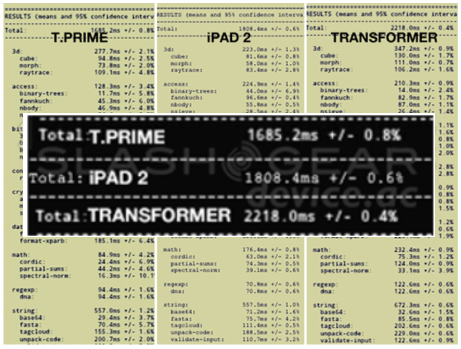
When it comes to specs alone, the quad-core Asus Transformer Prime is hard to beat. It’s faster, thinner and lighter than the iPad 2. It also has a higher resolution display and much better cameras than the iPad 2. Furthermore, it has a slot for an SD card and a really nice keyboard dock that transforms it into an ultrabook.

The Transformer Prime beats the iPad 2 in web browsing tests. Chart courtesy of SlashGear

Processor Speed Isn’t Everything

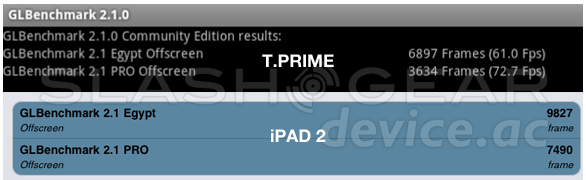
However, there’s more to the iPad than just specs. The iPad 2 beats the Transformer Prime in some graphic-related benchmarks as you can see in the chart below.

Battery Life Matters Too

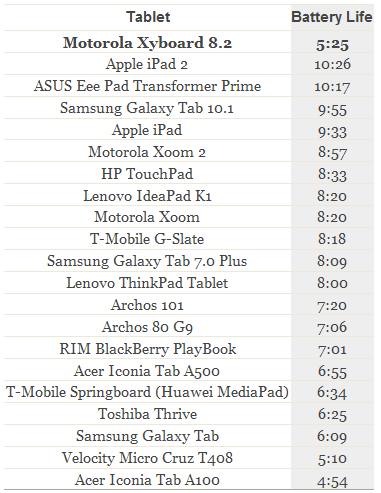
The Motorola Xyboard 8.2 is a strong performer (as you can see in the chart above), but has issues with battery life as you can see below. The iPad 2 currently leads in battery life, with the Transformer Prime a close second.

Chart courtesy of Engadget

How to Decide Which Tablet to Get

In the end, the only person who can answer this question is you. I suggest you first decide what you are buying the tablet for.

  • Do you spend hours playing games?
  • Will you use your tablet mostly for web browsing?
  • Do you need blazing-fast data speeds? Are you willing to pay a monthly fee for this privilege?
  • How important is battery life to you?
  • Are you an Apple fan who wants to sync your tablet with iCloud?

Once you answer these questions, you’ll find it easier to narrow down your list. Before making a final decision, I suggest you visit a few of the top tech blogs like Engadget or Gizmodo, and read their tablet reviews. I find them to be very helpful.

Since great new tablets are coming out every month, I’ll be updating this chart on a regular basis. Expect to see the first update after I return from CES in January.

Happy tablet shopping!

– Rick

Copyright 2011 Rick Schwartz. All rights reserved. Linking to this article is encouraged.
Cage Match: Samsung’s Galaxy Nexus vs. Apple’s iPhone 4S

The Galaxy Nexus (shown in orange) outperforms most other Android phones

Round 1 – Product Specifications

Many reviewers have heralded the Samsung Galaxy Nexus as the best Android phone ever. It supports LTE, has a 1.2GHz dual-core CPU, a 4.65” 720p display and is the first device to run Android 4.0. As you can see from the chart above, the Galaxy Nexus does well when you compare it to other Android devices, but how do its specs compare with the iPhone 4S? Read on to learn the answer.


Apple iPhone 4S

Samsung Galaxy Nexus

Processor

800MHz dual-core

1.2 GHz dual-core

RAM

512MB

1GB

Internal storage

16, 32, 64GB

32GB

Screen size

3.5”

4.65”

Display resolution

960×640

1280×720

Pixel density

326 ppi

316 ppi

Rear cam

8MP

5MP

Front cam

0.3MP

1.3MP

Network

HSPA

LTE

Dual-band Wi-Fi

No

Yes

NFC

No

Yes

Thickness

9.3mm

9.47mm

Weight

140g

150g

Battery

1420 mAh

1850 mAh

There is a clear winner when you compare the specs of these two devices. The Galaxy Nexus beats the iPhone 4S in 10 out of 14 specs. The specs the iPhone wins are important however: screen density, camera (MP), thickness and weight.

Round 1 Winner: Samsung Galaxy Nexus

Specs Can Be Deceiving

On paper the iPhone 4S doesn’t look that great. Its dual-core CPU runs at a clock speed which is 33% slower than the Galaxy Nexus (800MHz vs. 1.2GHz). But clock speed isn’t the only thing which determines the speed of a device. The graphics co-processor can have a big impact on performance, especially when running games. The mobile operating system and chipset can also have an impact on performance.

Software benchmarks are used to compare the performance of different devices? One of the best sources of this type of data is AnandTech. Unfortunately some of the best mobile benchmarks do not run on the iOS platform (e.g. Rightware BrowserMark, Quadrant, NenaMark, AnTuTu and Vellamo).

Fortunately there are some good benchmarking apps which run on both platforms. Let’s run a few of them and see how these two phones compare.

Round 2 – Browser Performance


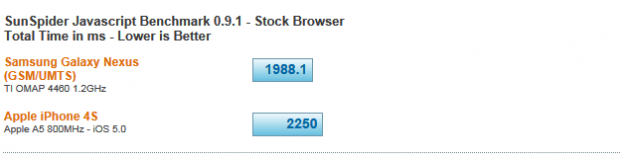
SunSpider is one of the most popular tests for browser performance. It’s designed to compare different browsers to each other. Although the chart above shows the non-LTE version of the Galaxy Nexus, I ran SunSpider on my LTE Nexus and got an even better score (1907). That’s 15% faster than the iPhone 4S. The first round is over and we have a winner.

Round 2 Winner: Samsung Galaxy Nexus

Round 3 – Graphics Performance

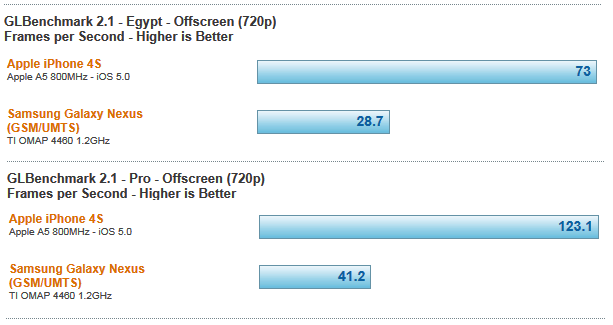
Let’s move on to round 2. This round will test graphics performance. GLBenchmark is an app which measures the graphic and computation capabilities of a mobile device. The majority of the tests it runs focus on things like high-level 3D animations.

I was expecting the iPhone 4S to beat the Galaxy Nexus in this test, but I wasn’t expecting such a big difference in scores. One possible explanation might be the fact the Galaxy Nexus has 50% more pixels to process than the iPhone 4S (921600 vs. 614400). In the real world, graphics on the iPhone 4S aren’t 3 times faster than the Galaxy Nexus. Both phones are great for gaming, and it’s unlikely you’ll see much difference in real-world use. In fact, in many real world tests the fastest Android phones kill the iPhone 4S in side-by-side speed tests. If you want to see just how much faster the Droid RAZR is than the iPhone 4S watch this video. Still, I’d be remiss to say this round was not a knock out — according to this benchmark.

Round 3 Winner: Apple iPhone 4S

NOTE: Since this article was written the iPhone 4S has lost it’s advantage in most benchmarks. Phones like the HTC One X and Samsung Galaxy SIII beat it badly in most benchmarks. More info.

Round 4 – Wi-Fi Performance

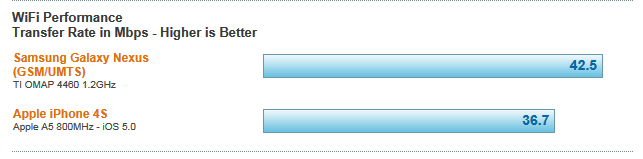
Wi-Fi performance is important to many users. In the test the Galaxy Nexus did better than the iPhone 4S, but the difference was only 16%. Perhaps a bigger difference between the two devices is the fact that the Galaxy Nexus supports dual-band Wi-Fi, and the iPhone 4S only supports 2.4GHz Wi-Fi. The 5GHz band is much less prone to interference, and can be faster than the 2.4GHz band.

Round 4 Winner: Samsung Galaxy Nexus

Round 5 – 3G/4G Data Speeds

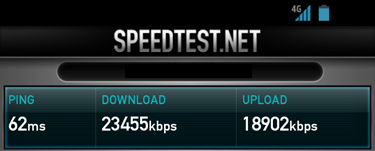
The best way to compare data speeds on two different phones is to run the same bandwidth test software on both. I use a popular app called Speed Test, which is available for both Android and iOS. It’s important to realize that data speeds vary by carrier. PC Magazine ran a good article recently which found iPhone 4S data speeds on AT&T’s network top out around 3-4Mbps. Verizon’s 3G network averaged 700kbps down, with peaks of 2.5Mbps; Sprint’s only eked out 480kbps on average, with peaks of 2.22Mbps. I was an AT&T customer for over 3 years and I never saw speeds on my iPhone approaching anywhere near 3Mbps, but I’ll give Apple the benefit of the doubt here.

The Galaxy Nexus is capable of data speeds 20-30x faster than the iPhone 4S

Even with PC Mag’s generous results on the AT&T’s network, a Galaxy Nexus on Verizon’s slower network, absolutely kills the iPhone in data speed tests. The reason for this is obvious: The iPhone 4S doesn’t have LTE support yet, and LTE speeds (even on Verizon’s slower network) blow away regular 3G HSPA speeds. In this test the Galaxy Nexus was 33 times faster than the iPhone 4S! So this round was a knock out.

Round 5 Winner: Samsung Galaxy Nexus

Round 6 – Battery Life

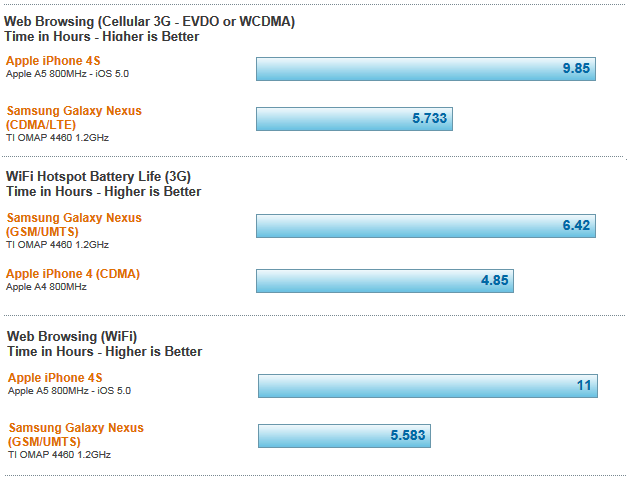
There is a price to be paid for the lightning-fast data speeds LTE phones like the Galaxy Nexus have. The price is poor battery life. Even though the Galaxy Nexus has a more powerful battery than the iPhone 4S (1850 mAh vs. 1420 mAh), its battery life is still worse. There are other factors for this as well, Apple underclocks their A5 processor, and Android’s true multitasking consumes more power than Apple’s approach, which suspends apps in the background. Nonetheless, the difference is clear in the charts below.

As you can see, the iPhone 4S kills the Galaxy Nexus in web browsing battery life over both 3G and Wi-Fi. The only bright spot for the Nexus is acting as a Wi-Fi hotspot over 3G. In those tests, the Galaxy Nexus operated 1.5 hrs longer than the iPhone 4S. That can probably be attributed to the larger battery in the Galaxy Nexus. [Note: This test was done with the European version of the Galaxy Nexus, no test data was available for the U.S. LTE version.]

Round 6 Winner: Apple iPhone 4S

Fight Results

Round 1 – Winner: Samsung Galaxy Nexus
Round 2 – Winner: Samsung Galaxy Nexus
Round 3 – Winner: Apple iPhone 4S
Round 4 – Winner: Samsung Galaxy Nexus
Round 5 – Winner: Samsung Galaxy Nexus
Round 6 – Winner: Apple iPhone 4S

The Victor

It was a long fight but the final round is over. If I was on the panel of judges, I would rule the Galaxy Nexus victor because it won 4 out of 6 rounds, but it was a close fight. Would you rule the same way?

– Rick

Copyright 2011 Rick Schwartz (text only). All rights reserved. Linking to this article is encouraged. All charts are courtesy of AnandTech.
Today’s Best Smartphones (December 2011)


Since this article was first written, an updated version has been posted here. Check it out. A lot has changed.

I’ve spent a lot of time over the past six months looking for a new smartphone. It hasn’t been an easy process because there are so many great phones available today. To make it possible to compare specs, I made the following chart:


Apple iPhone 4S

HTC Rezound

HTC Vivid

LG Nitro HD

Motorola Droid RAZR

Samsung Galaxy Nexus

Samsung Galaxy S II Skyrocket

Processor

800MHz dual-core

1.5 GHz dual-core

1.2 GHz dual-core

1.5 GHz dual-core

1.2 GHz dual-core

1.2 GHz dual-core

1.5 GHz dual-core

RAM

512MB

1GB

1GB

1GB

1GB

1GB

1GB

Storage

16-64GB

16GB

16GB

16GB

16GB

32GB

16GB

Screen

3.5”

4.3”

4.5”

4.5”

4.3”

4.65”

4.5”

Resolution

960×640

1280×720

960×540

1280×720

960×540

1280×720

800×480

Pixel density

326 ppi

342 ppi

245 ppi

 329 ppi

256 ppi

316 ppi

207 ppi

Rear cam

8MP

8MP

8MP

8MP

8MP

5MP

8MP

Front cam

0.3MP

2MP

1.3MP

1.3MP

1.3MP

1.3MP

2MP

Video

1080p @ 30fps

1080p @ 30fps

1080p @ 30fps

 1080p @ 30fps

1080p @ 30fps

1080p @ 30fps

1080p @ 30fps

Network

HSPA

LTE

LTE HSPA+

LTE HSPA+

LTE

LTE

LTE/HSPA+

Dual-band

No

No

No

No

No

Yes

Yes

Bluetooth

4.0

3.0

3.0

3.0

4.0

3.0

3.0

NFC

No

No

No

 No

No

Yes

 Yes

Thickness

9.3mm

 13.65mm

11.2mm

10.4mm

7.1mm

9.47mm

9.40mm

Weight

140g

170g

177g

128 g

127g

150g

132g

Battery

1420 mAh

 1620 mAh

1620 mAh

1830 mAh

1780 mAh

1850 mAh

1850 mAh

Operating System

iOS 5.0

Android 2.3.4

Android 2.3.5

Android 2.3.5

Android 2.3.5

Android 4.0.2

Android 2.3.4

Carrier(s)

AT&T, Verizon, Sprint

Verizon

AT&T

AT&T

Verizon

Verizon

AT&T

I suggest you start by deciding what matters the most to you.

  • Are you an Apple fan that has just got to have an iPhone?
  • Are you dying to get a phone that supports LTE for fastest possible data speeds?
  • Are you looking for the largest display, or the thinnest phone?

You get the idea. This chart should help you to narrow your decision down.

I should mention that I cut two phones from the chart due to space restrictions. I debated including a second chart, but decided against it because the specs of both of these phones, while good, are not as good as the other phones here. In case you’re wondering, the phones I cut were the Samsung Galaxy S II and the HTC Titan (a Windows Phone). There were also several other great phones I omitted because they are not yet available in the U.S. including the HTC Sensation XL, Samsung Galaxy Note and Samsung Galaxy S II HD LTE. Watch for the Galaxy Note to cross the pond next year.

Since great new smartphones are coming out every month, I’ll be posting frequent updates to this chart. Expect to see the first one after I return from CES in 2012.

If you think I missed a phone that should be here, let me know. Thanks.

– Rick

Note: An update to this article was recently published here.

Copyright 2011 Rick Schwartz. All rights reserved. Linking to this article is encouraged.
Ooma Telo is the One of The Best Land Line Replacements

If you’re still paying for local phone service, it’s time to switch to an Internet-based phone system. Over half of Americans no longer use a land line, according to government data. Internet-based phone systems let you to make long distance calls for a fraction of the cost of a traditional landline. In some cases, there is no monthly charge whatsoever. There are quite a few different companies offering voice over IP (VoIP) phone solutions, so it’s important you do some research before buying.

What The Experts Say


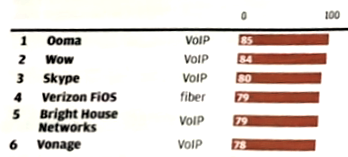
Speaking of research, I came across this blog post which compares most popular VoIP systems. After reading this, I decided Ooma was on my short list of products to consider. This wasn’t the first I’d heard about Ooma. I first heard about the Ooma Telo at Best Buy’s corporate headquarters. One of their senior technical managers told me he was using Ooma at home and recommended it highly. I also noticed Consumer Reports ranked Ooma as the #1 phone service. In their study, Ooma beat Skype, Verizon FIOS, Vonage, Cox, U-verse and all other VoIP services. These two recommendations were all I needed to take the plunge and purchase an Ooma Telo.

How Much Will You Save?


Phone rates vary. I was paying about $45 a month for my landline. The Ooma website has a nice little calculator, which estimates how much you will save using Ooma. In my case, the savings were considerable. I’ll save at least $1245 dollars over a three year period. Also, my Ooma hardware will pay for itself after only 5 months, not 7 months as the chart shows. That’s because I paid only $180 after tax and shipping.

Ooma Pros

This is a partial list of the advantages Ooma has over a conventional landline and other VoIP systems.

  • Unlimited free local and long distance anywhere in the U.S. Save hundreds of dollars a year over the cost of a conventional landline
  • Ooma Telo Handset

    • Does not require a computer like magicJack or Skype. This results in extra savings because your computer does not need to be left on
    • Better voice-quality than Skype, magicJack or any mobile phone
    • You can use your existing wired or wireless phones with it
    • Cheaper than Vonage – Even with the hardware cost and the optional $10 a month Premier Plan, Ooma is still often cheaper than Vonage for a year of service
    • Setup is easy and only takes about 10 minutes
    • Has an built-in answering machine for voice-mail. Caller ID, voice mail, call waiting are all free
    • Doesn’t have the annoying delays that VoIP systems like Skype sometimes have
    • Has a wide range of features and accessories, including a wireless handset, wireless adapter, Bluetooth adapter and a mobile HD app


    How Good is the Sound Quality?

    If you use Ooma with a good DECT 6.0 wireless phone, it sounds much better than Skype, magicJack or any mobile phone. It would probably sound even better, if the 2-Wire Gateway provided with AT&T’s U-verse service allowed me to give Ooma priority. Even with Ooma sharing bandwidth with everything else on my crowded network, I never get any echos or delays. Is it perfect? No. Occasionally, I hear other artifacts and small dropouts, but they aren’t very obvious and normally go away after a few seconds. I also bought their Ooma Telo handset because I heard it had even better sound quality, but it sounds a lot like my Panasonic phone. Since I’m signed up for their Premium package, I can have two different conversations going on at once. I have noticed the sound quality does drop when I do this, but it’s still acceptable.

    Ooma Cons

      No system is perfect. Here are some of the negatives of the Ooma Telo system.
    • Higher initial cost than most other VoIP systems ($179 currently)
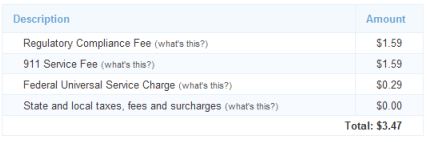
    • Ooma is not entirely free. You still have to pay monthly taxes of $3 to $4
    • Some cable-based phone systems have slightly better voice-quality than VOIP systems.
    • Ooma does occasionally have short drop outs in sound. You hear these most often when you're listening to your messages.A loud click occurs when the Ooma answering machine starts recording
    • International calling costs an additional $9.95 a month for 1000 minutes. Right now, you can call Canada is free3-way calling and some other optional features cost an extra $10 a month
    • Not as good for travel as magicJack or Skype, because it requires a 5.5” x 7.5” box


    Ooma is not entirely free. There is a small monthly fee.

    Activating Your Ooma Telo

      Setting up an Ooma system takes about 10 minutes. First you go online to Ooma.com/activate.
    • Next, type in the activation code found on the back of the Ooma Telo box.
    • Then enter the area code for your new Ooma phone number. It doesn't have to be the same as your old area code. If you want to keep your old phone number, you must pay a one-time $40 fee which  is waived if you subscribe to Ooma Premier.
    • Now enter your contact info and address. This is used for 911 services.
    • Next, enter your billing information. This is used to pay your monthly taxes and any upgrades you decide to add.
    • Finally, select a password and answer a security question.


    Setting up an Ooma Telo is easy

    System Setup

      Once you’re activated, you’re only three steps away from making a phone call:
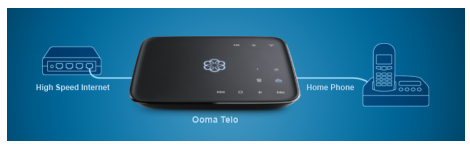
    • Connect your Ooma Telo box to your cable modem, DSL modem or home gateway. Although it’s best to connect your Ooma box between your modem and router, it works fine if you connect it to an integrated modem/router.
    • Connect your corded or cordless phone to the Ooma box.
    • Power up the Ooma Telo and wait for it to update its software. This took 5-10 minutes on the first Ooma box I installed and was not required on the second one.

     
    That’s it! Now you’re ready to make free local and long distance calls. When you turn on your phone you should hear Ooma’s special dial tone.

    Is Ooma Right for Everyone?

    No. Ooma is a good system but it’s not right for everyone. VoIP-based phone services are not ideal for:

    • People who can’t lose phone service when their power or Internet is down
    • People with alarm systems that communicate via landline. Ooma recommends you maintain a basic landline  for the purposes of your alarm system, or move to a cellular-based alarm panel
    • Someone who doesn’t want to have their Ooma answering machine in the same room as their modem or router. Installing a Ooma Wireless Adapter or HomePlug network addresses this problem
    • Those with wireless phone systems where the base station can’t be moved near the Ooma phone box
    • Those without a high-speed Internet connection (like all other VoIP systems except cable)


    Scare Tactics

    Porting your phone number can be a little intimidating for DSL users.

    • They say you need to contact your broadband provider and request a dry loop DSL
    • They also warn there could be cancellation charges. No one I know has been charged for this
    • They also say it could take up to two weeks to port your number. In my case, it took about 4 days
    • They also warn your broadband or TV service could go down if the the port isn’t done correctly. We didn’t lose service.
    • They also say you must call your phone company after the number port to cancel your service

     
    I’ve done two separate number ports so far, and had no problems with any of the things listed above. Both were in homes with DSL and an IP-based TV system (e.g. AT&T U-verse). The only thing that you should be aware of,  is the fact your communications bundle pricing could go up if you got a discount for bundled phone service before. Normally this will be about $10.

    Ooma Extras

    Ooma charges $10 extra a month for their Premiere features. The Premiere package has so many features, I can’t go into them all here. I listed a few highlights below. You can read about the rest here.

    • Instant Second Line  – Allows you to make or take two simultaneous calls from a single phone number
    • Blacklists – Help you block telemarketers. This is one of my favorite features and the main reason I spent the extra $10
    • Multi-ring – Lets you answer calls from your home phone or cell phone
    • Message Screening – Allows you to listen-in as the caller leaves their message
    • Send to Voicemail – Allows you to transfer a call to your voicemail
    • Voicemail Forwarding – Lets you forward voicemail, so that you can listen to it from your favorite email program
    • Do Not Disturb – Allows you to roll your calls into voicemail without ringing your phone
    • Personal Numbers – Allows you to select additional phone numbers in any calling area in the U.S.


    Summary

    I’ve been using Ooma now for about six months and have no major complaints so far. My only gripe so far is the loud click the person calling you hears when you pick up the phone (or the answering machine starts recording). No one in my family has said much about the switch so far, which is good news. I love the ability to blacklist telemarketers, and have it setup so they hear a disconnected number message when they call. The bottom line is, Ooma Telo a good replacement for your landline and the savings are substantial.

    – Rick

    Copyright 2011 Rick Schwartz. All rights reserved. Linking to this article is encouraged.
    Follow me on Twitter @mostlytech1

Ten Things You Should Know About Mobile Specs

Specifications are helpful when you’re trying to compare two different mobile devices, but the devil is in the details — especially when you’re looking at unreleased products. Here are some tips that will help you better evaluate phone and tablet specs.

1. Most Apple rumors are bogus

Real leaks from Apple employees and their suppliers are rare. Go back and read all of the Apple rumors last summer, and you’ll see most of the predictions turned out to be wrong. Sadly, tech blogs print these rumors to increase their page views – even when they don’t have an accurate source.

2. Phone specs vary by carrier

It’s not unusual to see differences in the specs listed by a handset manufacturer and different carriers. Carrier customization is quite common. Expect to see differences in the network type (HSPA, HSPA+, LTE, WiMAX), operating system version, device thickness and weight. Sometimes even screen size and processor speed varies. For example, the official Samsung website says the Galaxy S II has a 4.3” screen, but T-Mobile’s version of the same phone has a 4.52” screen and more powerful battery. It’s also taller, thicker and has a faster processor.

3. LTE devices are thicker

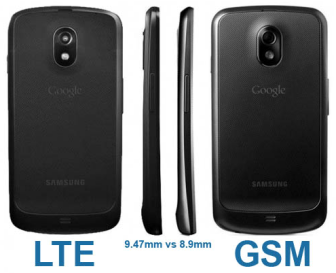
As you can see in the image above, the LTE version of the Samsung Galaxy Nexus is thicker than the GSM version of the same phone. The reason for the .57mm difference is the addition of a slightly larger battery, needed to power the juice-hungry LTE radio.

4. Not all specs are standardized

There are different ways to measure brightness, viewing angle and battery life. Because of this lack of standardization, we have to accept what manufacturers tell us. Specs like battery life and brightness are often exaggerated. Screen density (PPI) is another spec which is sometimes suspect. Was it provided by the panel manufacturer, or calculated using a formula?

5. Your phone may not be as thin as you think it is

Speaking of truth in advertising, let’s talk about thickness. Most manufacturers use the thinnest part of a device for this spec. As an example, the 7.1 mm Motorola Droid RAZR is the world’s thinnest 4G device. But the RAZR has a large hump at the top, which is at least 11 mm. Shouldn’t that be mentioned on the spec sheet?

The Droid RAZR has a hump at the top which increases its thickness.

6. Not all 4G phones are created equally

There’s a big difference between the data speeds of HSPA and LTE or WiMAX devices. Just because a manufacturer claims a phone is a 4G, doesn’t mean you’re going to get WiMAX or LTE speeds. 3G Phones like the iPhone 4S, operate at speeds that are 5 to 10 times slower than 4G LTE phones. More info

7. Specs on the Web are often incorrect

The specs listed for unreleased devices on sites like Phone Arena are often incorrect. Not all of them are wrong, but errors are common and some specs aren’t available until after a device has been released.

8. Beware of OS upgrade promises

Don’t assume your phone will get new software updates right after they are available. It took HTC 9 months to release an Android 2.3.4 update for the Droid Incredible. Some devices will never be able to upgrade to Android 4.0.

9. First is not always best

Some handset manufacturers will do anything to release the newest handset technology first – even if it means rushing it to market (e.g. AT&T). Others, like Verizon seem to take forever. For example, the Droid Bionic was announced at the 2011 CES, but wasn’t released until 9 months later.

10. Numbers lie

And last, but certainly not least, processor speed isn’t the only indication of performance. The iPhone 4S only has an 800MHz CPU, but outperforms the Samsung Galaxy S II in some benchmarks – even though it has a 1.2GHz CPU. The OS, mobile chipsets and especially the graphic coprocessor can have a major impact on performance.

– Rick

Copyright 2011 Rick Schwartz. All rights reserved. Linking to this article is encouraged.