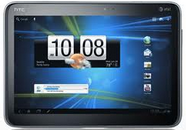
Jumping Ship – Moving from iOS to Android

I Was an iPhone Addict

I’ve been a hardcore iPhone user for the past several years. Like most iPhone users, I had a hard time imagining ever switching to another phone. I’d seen some early Android phones and their user interface didn’t look nearly as polished as iOS. I also thought the transition would be too hard and I might regret making the switch. I knew my iPhone so well I could practically operate it blindfolded.

Why Would Anyone Defect?

I had planned to buy an iPhone 5 the first day it was available. However, once the iPhone 4S was announced, and it became clear an iPhone 5 was not going to be released in 2011, I started having second thoughts. My old iPhone had slowed down to the point it was sometimes frustrating to use. I’m not sure if this was a result of iOS, or the fact I was on the AT&T network, which is horrible where I live. While I was researching this problem, I learned about the differences between 4G LTE and the 4G imposters like HSPA+. 4G LTE phones are 5 to 12 times faster than other phones. Two things were clear to me:

  1. My next phone must support LTE
  2. My next phone must run on the Verizon network

More about the confusion around 4G data speeds can be found here.
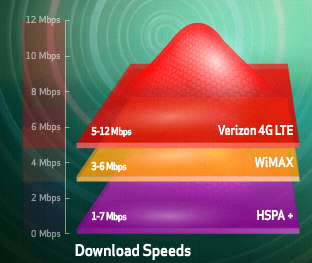
Verizon's LTE speed comparison

These two requirements made my decision easier. The iPhone 4S had disappointing specs (compared to the newest Android phones) and it did not support LTE. There was no way I was going to sign another two-year contract on a non-LTE phone.

So, I started looking into Android phones. I’d heard about the Samsung Galaxy Nexus and read several reviews which said it was the best Android phone ever. Some of the reviews said Android 4.0 was more intuitive than earlier versions, and even had the nerve to compare it to iOS. So I took a big leap of faith and bought a Samsung Galaxy Nexus the first day they became available. I wasn’t too worried, because I had two weeks to return the phone if I didn’t like it.

More about the differences between iPhone 4S and the Galaxy Nexus can be found here.

I immediately started using my new Galaxy Nexus and was surprised the transition wasn’t as difficult as I thought it would be. Once I installed a few of my favorite apps, I was on my way. I did encounter a few hurdles along the way, so I made a list of suggestions for a trouble free transition from iOS to Android.

Ten Steps to a Trouble-free Transition

Once you get through these steps, you’ll be on your way to being a happy Android user.

  1. First things first – Start by creating a Google account (if you don’t already have one) and enter your credit card so you can purchase apps. This account will allow you to backup everything on your phone to the cloud, and sync with other Google apps. Next, enter the key for your Wi-Fi network.
  2. Setup your voice mail – Now learn how to makes call and setup your voice mail.  On my phone, I have to dial *86 to check my voice mail, your phone may have a dedicated button for this.
  3. Install your favorite apps – Now go to the Android Market and install a few of your most-used apps. Don’t bother to make a list of your old apps. If you really need them, you’ll remember their names.
  4. How do I switch apps without that big button? – One of the first hurdles I encountered was figuring out how the Home button works on Android phones. Both phones have Home buttons, but they work a little differently.

    iOS Home button

    • Pressing that big Home button on the iPhone always takes you back to the main Home screen. Pressing the Home button on an Android 4.0 phone takes you back to the last Home screen you were on.

      Android's Home button

    • Pressing the Home button on the home screen of an iPhone takes you to the Search screen. This doesn’t happen on Android phones because the search box is displayed on every home screen.

      Android's Recent Apps button

    • Double-pressing the Home button on an iPhone 4S shows your most recently opened apps.  You can do the same thing on an Android 4.0 phone by pressing the Recent Apps button. The only difference is that you scroll up and down, instead of left to right.

      Android's Back button

    • Two other important navigation differences exist between the iPhone and Android phones are the Menu and Back buttons. The Back button on an Android phone works like the back button on your browser. Once you get used to doing this, I think you’ll find it very useful.

      Android's Menu button

    • The same is true with the Menu button. On Android phones before 4.0, there is a dedicated Menu button which works much like the right mouse button on a Windows PC. This can also be a real time saver once you get used to it. On an iPhone you have to go to the Setting app to access options which are available in the Menu key on Android phones. Note:On Android 4.0 phones the Menu button is only displayed once you launch an app.

      Android's App Drawer

    • Another difference is the fact that all downloaded iOS apps must appear on one of the iPhone’s home screens. On Android, this is not the case. All apps are displayed when you touch the App Drawer. It’s up to you which app you want to have displayed on your five home screens.
  5. Syncing your calendar and contacts – Google automatically syncs all of your Google contacts and calendars. If you want to sync your work contacts and calender, it’s easy. Click on the E-mail app and then select Settings using the menu key. Then click Add Account and enter your work e-mail and password. In a few minutes, all of your work contacts and calendar will be synced with your Android phone. When you add a new contact or appointment to your calendar, it will instantly appear on your Android phone without any type of manual sync needed.
  6. Learn how Notifications work – Notifications work a little different on Android and iOS 5.0 devices. On an Android phone, you’ll see different icons at the top of the screen every time you receive a new e-mail or other activities. Like iOS, you swipe down from the top of the screen to view your notifications.  Once you review them, just click the “X” to clear them.
  7. Install the “must-have” Android apps – Every platform has its own “must-have” apps. CNET recently published a list of some of the best Android apps. You may want to download some of these after you get a new Android phone.
  8. Optimize your battery life – If you get a lot of e-mail, you need to make some changes to extend your battery life.  Load the E-mail app, go to Settings and set the Inbox check frequency to 1 hour or never. You can still manually sync at any time. Other good battery-saving suggestions can be found here.
  9. Make it your own– Learn how to customize your Home screens. Move your app shortcuts around, create folders for similar apps and deleting apps you don’t use daily. Learn how to use widgets. Widgets are a big differentiator between Android and iOS.
  10. Relax – Don’t expect to master a new mobile operating system over night. It could take days — even  weeks until you are fully comfortable with your new phone. Be patient while you adjust to some new ways of doing things. The effort you put in will be worth it in the end.

Would I Ever Go Back to Apple?

Sure. I didn’t buy an iPhone because all of my friends had one. In fact, when I bought my first iPhone, it wasn’t that popular. I bought it because it was the best mobile device available at the time. That’s the same reason I recently bought a Samsung Galaxy. I want the fastest and best phone on the planet. I don’t care who makes it.

Which Mobile OS Do I Prefer?

In another blog post, I compare Android 4.1 with iOS 6, and let you know which things I like best about each. You won’t want to miss those posts.

– Rick

Since this article was first written, the iPhone 5 has come out and I’ve switched to a Samsung Galaxy S III. Gizmodo ran a really good article which also talks about making the switch from Android to iOS. I must not be the only person switching, because there are now four times more Android phones than Apple phones. Even with the iPhone 5, it’s going to be impossible for Apple to ever catch up.

Copyright 2012 Rick Schwartz. All rights reserved. Linking to this article is encouraged.

Follow me on Twitter @mostlytech1
Today’s Best Tablets (December 2011)

This article was just updated! You can view the new version here.

Tablets continue to be some of the best selling CE devices. With new tablets coming out every few weeks, it’s hard to pick the best one. To make this process easier, I made the following chart.

Top Performing Tablets


Apple     iPad 2

Trans-former   Prime

Droid   Xyboard 8.2

Droid   Xyboard 10.1

HTC Jetstream

Samsung   Galaxy Tab 10.1

Processor

1.0 GHz   dual-core

1.3 GHz quad-core

1.2 GHz dual-core

1.2 GHz dual-core

1.5 GHz dual-core

1.0 GHz dual-core

RAM

512MB

1GB

1GB

1GB

1GB

1GB

Internal   storage

16/32/64

16/32/64

16/32

16/32/64

32

16/32/64

Screen   size

9.7”

10.1”

8.2”

10.1”

10.1”

10.1”

Display

1024×768

1280×800

1280×800

1280×800

1280×800

1280×800

Pixel   density

132 ppi

145 ppi

~184 ppi

~149 ppi

150 ppi

149 ppi

Rear   cam

0.92

8MP

5MP

5MP

8MP

3MP

Front   cam

0.92

1.2MP

1.3MP

1.3MP

1.3MP

2MP

Video

720p

1080p

720p

720p

1080p

1080p

4G data

No LTE

No LTE

LTE

LTE

LTE

LTE

Dual-band   Wi-Fi

Yes

No

No

No

No

Yes

Bluetooth

2.1

2.1

2.1

2.1

3.0

3.0

Mic

Yes

Yes

Yes

Yes

Yes

Yes

NFC

No

No

No

No

No

No?

Thickness

8.8mm

8.3 mm

8.89 mm

8.80 mm

13 mm

8.6 mm

Weight

601g

586g

386g

603g

709g

565g

Battery

6930 mAh

6579 mAh

3960 mAh

7000 mAh

7300 mAh

7000 mAh

OS

iOS 5.0

Android   3.2

Android   3.2

Android   3.2

Android 3.1

Android   3.1

USB

Via adapter

Yes

Yes

Yes

Yes

Via adapter

HDMI

Via adapter

Yes

Yes

Yes

No

Via   adapter

SD Slot

No

Yes

No

No

Yes

Via   adapter

IR Emitter

No

No

Yes

Yes

No

No

Price

$499   (16GB)

$499 (16GB)

$429 (16GB)

$529 (16GB)

$699   (32GB)

$499   (16GB)

Most of the tablets in this chart are second generation devices which outperform their predecessors.

What About the Kindle Fire?

You probably noticed the Kindle Fire and Nook Tablet were omitted from the chart above. This was done for two reasons: First, it’s not fair to compare a $200 tablet with a $500 tablet. Second, the Kindle Fire, along with the rest of the tablets here, are not the highest performing tablets available today. Still, the Kindle is an exceptional value and I would recommend it to many people.
Here are its specs, along with some others, in case want to compare them:


Amazon Kindle Fire

B&N Nook Tablet

Samsung Galaxy Tab Plus 7

Samsung Galaxy Tab 8.9

Processor

1.0 GHz dual-core

1.0 GHz dual-core

1.2 GHz dual-core

1.0 GHz dual-core

RAM

512MB

1GB

1GB

1GB

Internal storage

8

16

16/32

16/32

Screen size

7.0”

7.0”

7.0”

8.9”

Display res.

1024×600

1024×600

1024×600

1280×800

Pixel density

169 ppi

169 ppi

169 ppi

170 ppi

Rear cam

None

None

3MP

3MP

Front cam

None

None

2MP

2MP

Video

N/A

N/A

1080p

1080p

4G data

No LTE

No LTE

No LTE

LTE avail

Dual-band Wi-Fi

No

No

No

No

Bluetooth

None

None

3.0

3.0

Mic

No

Yes

Yes

Yes

NFC

No

No

No?

No?

Thickness

12.4mm

13.2mm

9.9 mm

8.6 mm

Weight

414g

400g

345g

470g

Battery

4400 mAh

4000 mAh

4000 mAh

6100 mAh

OS

Android 2.3

Android 2.3 Custom

Android 3.2

Android 3.1

USB

Yes

Yes – Micro

No

Yes – Micro

HDMI

No

No

No

No

SD Slot

No

Yes

Yes – Micro

Yes

IR Emitter

No

No

Yes

No

Price

$199

$249

$399

$469 (16GB)

I should also mention I stuck two of the Galaxy Tabs in this chart because there wasn’t enough room in the first chart. Both are top performers.

So, What is the Best Tablet?

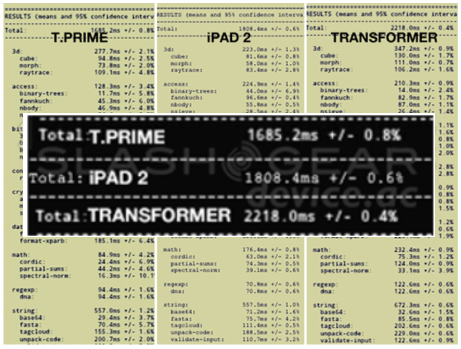
When it comes to specs alone, the quad-core Asus Transformer Prime is hard to beat. It’s faster, thinner and lighter than the iPad 2. It also has a higher resolution display and much better cameras than the iPad 2. Furthermore, it has a slot for an SD card and a really nice keyboard dock that transforms it into an ultrabook.

The Transformer Prime beats the iPad 2 in web browsing tests. Chart courtesy of SlashGear

Processor Speed Isn’t Everything

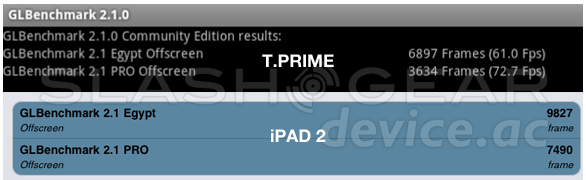
However, there’s more to the iPad than just specs. The iPad 2 beats the Transformer Prime in some graphic-related benchmarks as you can see in the chart below.

Battery Life Matters Too

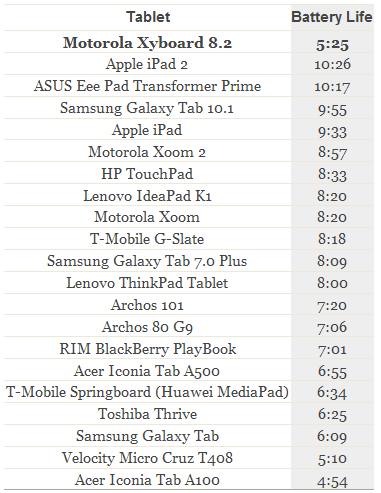
The Motorola Xyboard 8.2 is a strong performer (as you can see in the chart above), but has issues with battery life as you can see below. The iPad 2 currently leads in battery life, with the Transformer Prime a close second.

Chart courtesy of Engadget

How to Decide Which Tablet to Get

In the end, the only person who can answer this question is you. I suggest you first decide what you are buying the tablet for.

  • Do you spend hours playing games?
  • Will you use your tablet mostly for web browsing?
  • Do you need blazing-fast data speeds? Are you willing to pay a monthly fee for this privilege?
  • How important is battery life to you?
  • Are you an Apple fan who wants to sync your tablet with iCloud?

Once you answer these questions, you’ll find it easier to narrow down your list. Before making a final decision, I suggest you visit a few of the top tech blogs like Engadget or Gizmodo, and read their tablet reviews. I find them to be very helpful.

Since great new tablets are coming out every month, I’ll be updating this chart on a regular basis. Expect to see the first update after I return from CES in January.

Happy tablet shopping!

– Rick

Copyright 2011 Rick Schwartz. All rights reserved. Linking to this article is encouraged.

Cage Match: Samsung’s Galaxy Nexus vs. Apple’s iPhone 4S

The Galaxy Nexus (shown in orange) outperforms most other Android phones

Round 1 – Product Specifications

Many reviewers have heralded the Samsung Galaxy Nexus as the best Android phone ever. It supports LTE, has a 1.2GHz dual-core CPU, a 4.65” 720p display and is the first device to run Android 4.0. As you can see from the chart above, the Galaxy Nexus does well when you compare it to other Android devices, but how do its specs compare with the iPhone 4S? Read on to learn the answer.


Apple iPhone 4S

Samsung Galaxy Nexus

Processor

800MHz dual-core

1.2 GHz dual-core

RAM

512MB

1GB

Internal storage

16, 32, 64GB

32GB

Screen size

3.5”

4.65”

Display resolution

960×640

1280×720

Pixel density

326 ppi

316 ppi

Rear cam

8MP

5MP

Front cam

0.3MP

1.3MP

Network

HSPA

LTE

Dual-band Wi-Fi

No

Yes

NFC

No

Yes

Thickness

9.3mm

9.47mm

Weight

140g

150g

Battery

1420 mAh

1850 mAh

There is a clear winner when you compare the specs of these two devices. The Galaxy Nexus beats the iPhone 4S in 10 out of 14 specs. The specs the iPhone wins are important however: screen density, camera (MP), thickness and weight.

Round 1 Winner: Samsung Galaxy Nexus

Specs Can Be Deceiving

On paper the iPhone 4S doesn’t look that great. Its dual-core CPU runs at a clock speed which is 33% slower than the Galaxy Nexus (800MHz vs. 1.2GHz). But clock speed isn’t the only thing which determines the speed of a device. The graphics co-processor can have a big impact on performance, especially when running games. The mobile operating system and chipset can also have an impact on performance.

Software benchmarks are used to compare the performance of different devices? One of the best sources of this type of data is AnandTech. Unfortunately some of the best mobile benchmarks do not run on the iOS platform (e.g. Rightware BrowserMark, Quadrant, NenaMark, AnTuTu and Vellamo).

Fortunately there are some good benchmarking apps which run on both platforms. Let’s run a few of them and see how these two phones compare.

Round 2 – Browser Performance


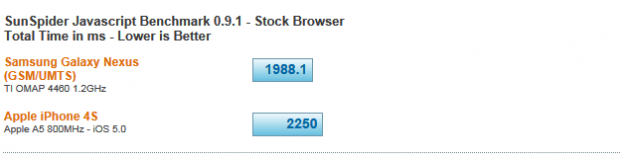
SunSpider is one of the most popular tests for browser performance. It’s designed to compare different browsers to each other. Although the chart above shows the non-LTE version of the Galaxy Nexus, I ran SunSpider on my LTE Nexus and got an even better score (1907). That’s 15% faster than the iPhone 4S. The first round is over and we have a winner.

Round 2 Winner: Samsung Galaxy Nexus

Round 3 – Graphics Performance

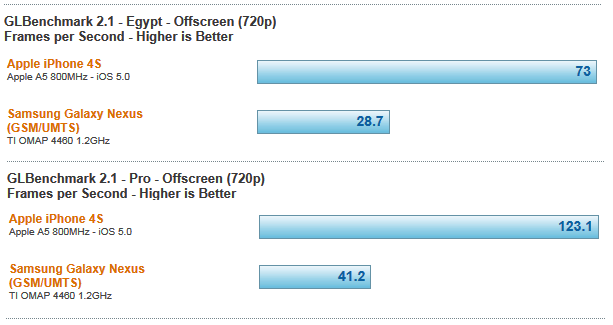
Let’s move on to round 2. This round will test graphics performance. GLBenchmark is an app which measures the graphic and computation capabilities of a mobile device. The majority of the tests it runs focus on things like high-level 3D animations.

I was expecting the iPhone 4S to beat the Galaxy Nexus in this test, but I wasn’t expecting such a big difference in scores. One possible explanation might be the fact the Galaxy Nexus has 50% more pixels to process than the iPhone 4S (921600 vs. 614400). In the real world, graphics on the iPhone 4S aren’t 3 times faster than the Galaxy Nexus. Both phones are great for gaming, and it’s unlikely you’ll see much difference in real-world use. In fact, in many real world tests the fastest Android phones kill the iPhone 4S in side-by-side speed tests. If you want to see just how much faster the Droid RAZR is than the iPhone 4S watch this video. Still, I’d be remiss to say this round was not a knock out — according to this benchmark.

Round 3 Winner: Apple iPhone 4S

NOTE: Since this article was written the iPhone 4S has lost it’s advantage in most benchmarks. Phones like the HTC One X and Samsung Galaxy SIII beat it badly in most benchmarks. More info.

Round 4 – Wi-Fi Performance

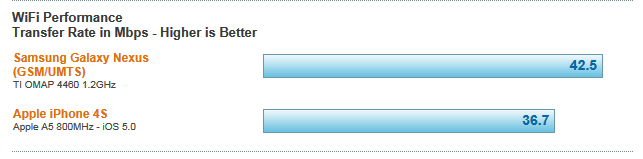
Wi-Fi performance is important to many users. In the test the Galaxy Nexus did better than the iPhone 4S, but the difference was only 16%. Perhaps a bigger difference between the two devices is the fact that the Galaxy Nexus supports dual-band Wi-Fi, and the iPhone 4S only supports 2.4GHz Wi-Fi. The 5GHz band is much less prone to interference, and can be faster than the 2.4GHz band.

Round 4 Winner: Samsung Galaxy Nexus

Round 5 – 3G/4G Data Speeds

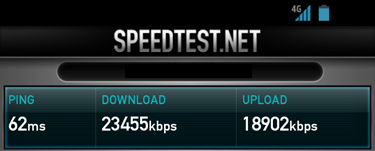
The best way to compare data speeds on two different phones is to run the same bandwidth test software on both. I use a popular app called Speed Test, which is available for both Android and iOS. It’s important to realize that data speeds vary by carrier. PC Magazine ran a good article recently which found iPhone 4S data speeds on AT&T’s network top out around 3-4Mbps. Verizon’s 3G network averaged 700kbps down, with peaks of 2.5Mbps; Sprint’s only eked out 480kbps on average, with peaks of 2.22Mbps. I was an AT&T customer for over 3 years and I never saw speeds on my iPhone approaching anywhere near 3Mbps, but I’ll give Apple the benefit of the doubt here.

The Galaxy Nexus is capable of data speeds 20-30x faster than the iPhone 4S

Even with PC Mag’s generous results on the AT&T’s network, a Galaxy Nexus on Verizon’s slower network, absolutely kills the iPhone in data speed tests. The reason for this is obvious: The iPhone 4S doesn’t have LTE support yet, and LTE speeds (even on Verizon’s slower network) blow away regular 3G HSPA speeds. In this test the Galaxy Nexus was 33 times faster than the iPhone 4S! So this round was a knock out.

Round 5 Winner: Samsung Galaxy Nexus

Round 6 – Battery Life

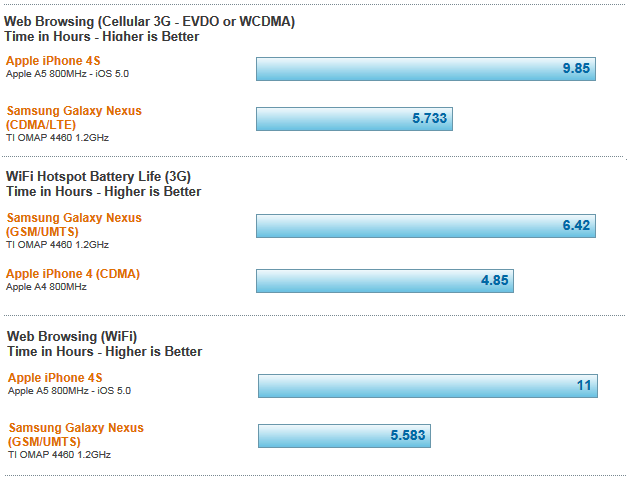
There is a price to be paid for the lightning-fast data speeds LTE phones like the Galaxy Nexus have. The price is poor battery life. Even though the Galaxy Nexus has a more powerful battery than the iPhone 4S (1850 mAh vs. 1420 mAh), its battery life is still worse. There are other factors for this as well, Apple underclocks their A5 processor, and Android’s true multitasking consumes more power than Apple’s approach, which suspends apps in the background. Nonetheless, the difference is clear in the charts below.

As you can see, the iPhone 4S kills the Galaxy Nexus in web browsing battery life over both 3G and Wi-Fi. The only bright spot for the Nexus is acting as a Wi-Fi hotspot over 3G. In those tests, the Galaxy Nexus operated 1.5 hrs longer than the iPhone 4S. That can probably be attributed to the larger battery in the Galaxy Nexus. [Note: This test was done with the European version of the Galaxy Nexus, no test data was available for the U.S. LTE version.]

Round 6 Winner: Apple iPhone 4S

Fight Results

Round 1 – Winner: Samsung Galaxy Nexus
Round 2 – Winner: Samsung Galaxy Nexus
Round 3 – Winner: Apple iPhone 4S
Round 4 – Winner: Samsung Galaxy Nexus
Round 5 – Winner: Samsung Galaxy Nexus
Round 6 – Winner: Apple iPhone 4S

The Victor

It was a long fight but the final round is over. If I was on the panel of judges, I would rule the Galaxy Nexus victor because it won 4 out of 6 rounds, but it was a close fight. Would you rule the same way?

– Rick

Copyright 2011 Rick Schwartz (text only). All rights reserved. Linking to this article is encouraged. All charts are courtesy of AnandTech.

Today’s Best Smartphones (December 2011)


Since this article was first written, an updated version has been posted here. Check it out. A lot has changed.

I’ve spent a lot of time over the past six months looking for a new smartphone. It hasn’t been an easy process because there are so many great phones available today. To make it possible to compare specs, I made the following chart:


Apple iPhone 4S

HTC Rezound

HTC Vivid

LG Nitro HD

Motorola Droid RAZR

Samsung Galaxy Nexus

Samsung Galaxy S II Skyrocket

Processor

800MHz dual-core

1.5 GHz dual-core

1.2 GHz dual-core

1.5 GHz dual-core

1.2 GHz dual-core

1.2 GHz dual-core

1.5 GHz dual-core

RAM

512MB

1GB

1GB

1GB

1GB

1GB

1GB

Storage

16-64GB

16GB

16GB

16GB

16GB

32GB

16GB

Screen

3.5”

4.3”

4.5”

4.5”

4.3”

4.65”

4.5”

Resolution

960×640

1280×720

960×540

1280×720

960×540

1280×720

800×480

Pixel density

326 ppi

342 ppi

245 ppi

 329 ppi

256 ppi

316 ppi

207 ppi

Rear cam

8MP

8MP

8MP

8MP

8MP

5MP

8MP

Front cam

0.3MP

2MP

1.3MP

1.3MP

1.3MP

1.3MP

2MP

Video

1080p @ 30fps

1080p @ 30fps

1080p @ 30fps

 1080p @ 30fps

1080p @ 30fps

1080p @ 30fps

1080p @ 30fps

Network

HSPA

LTE

LTE HSPA+

LTE HSPA+

LTE

LTE

LTE/HSPA+

Dual-band

No

No

No

No

No

Yes

Yes

Bluetooth

4.0

3.0

3.0

3.0

4.0

3.0

3.0

NFC

No

No

No

 No

No

Yes

 Yes

Thickness

9.3mm

 13.65mm

11.2mm

10.4mm

7.1mm

9.47mm

9.40mm

Weight

140g

170g

177g

128 g

127g

150g

132g

Battery

1420 mAh

 1620 mAh

1620 mAh

1830 mAh

1780 mAh

1850 mAh

1850 mAh

Operating System

iOS 5.0

Android 2.3.4

Android 2.3.5

Android 2.3.5

Android 2.3.5

Android 4.0.2

Android 2.3.4

Carrier(s)

AT&T, Verizon, Sprint

Verizon

AT&T

AT&T

Verizon

Verizon

AT&T

I suggest you start by deciding what matters the most to you.

  • Are you an Apple fan that has just got to have an iPhone?
  • Are you dying to get a phone that supports LTE for fastest possible data speeds?
  • Are you looking for the largest display, or the thinnest phone?

You get the idea. This chart should help you to narrow your decision down.

I should mention that I cut two phones from the chart due to space restrictions. I debated including a second chart, but decided against it because the specs of both of these phones, while good, are not as good as the other phones here. In case you’re wondering, the phones I cut were the Samsung Galaxy S II and the HTC Titan (a Windows Phone). There were also several other great phones I omitted because they are not yet available in the U.S. including the HTC Sensation XL, Samsung Galaxy Note and Samsung Galaxy S II HD LTE. Watch for the Galaxy Note to cross the pond next year.

Since great new smartphones are coming out every month, I’ll be posting frequent updates to this chart. Expect to see the first one after I return from CES in 2012.

If you think I missed a phone that should be here, let me know. Thanks.

– Rick

Note: An update to this article was recently published here.

Copyright 2011 Rick Schwartz. All rights reserved. Linking to this article is encouraged.

Ten Things You Should Know About Mobile Specs

Specifications are helpful when you’re trying to compare two different mobile devices, but the devil is in the details — especially when you’re looking at unreleased products. Here are some tips that will help you better evaluate phone and tablet specs.

1. Most Apple rumors are bogus

Real leaks from Apple employees and their suppliers are rare. Go back and read all of the Apple rumors last summer, and you’ll see most of the predictions turned out to be wrong. Sadly, tech blogs print these rumors to increase their page views – even when they don’t have an accurate source.

2. Phone specs vary by carrier

It’s not unusual to see differences in the specs listed by a handset manufacturer and different carriers. Carrier customization is quite common. Expect to see differences in the network type (HSPA, HSPA+, LTE, WiMAX), operating system version, device thickness and weight. Sometimes even screen size and processor speed varies. For example, the official Samsung website says the Galaxy S II has a 4.3” screen, but T-Mobile’s version of the same phone has a 4.52” screen and more powerful battery. It’s also taller, thicker and has a faster processor.

3. LTE devices are thicker

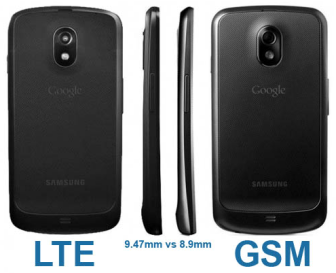
As you can see in the image above, the LTE version of the Samsung Galaxy Nexus is thicker than the GSM version of the same phone. The reason for the .57mm difference is the addition of a slightly larger battery, needed to power the juice-hungry LTE radio.

4. Not all specs are standardized

There are different ways to measure brightness, viewing angle and battery life. Because of this lack of standardization, we have to accept what manufacturers tell us. Specs like battery life and brightness are often exaggerated. Screen density (PPI) is another spec which is sometimes suspect. Was it provided by the panel manufacturer, or calculated using a formula?

5. Your phone may not be as thin as you think it is

Speaking of truth in advertising, let’s talk about thickness. Most manufacturers use the thinnest part of a device for this spec. As an example, the 7.1 mm Motorola Droid RAZR is the world’s thinnest 4G device. But the RAZR has a large hump at the top, which is at least 11 mm. Shouldn’t that be mentioned on the spec sheet?

The Droid RAZR has a hump at the top which increases its thickness.

6. Not all 4G phones are created equally

There’s a big difference between the data speeds of HSPA and LTE or WiMAX devices. Just because a manufacturer claims a phone is a 4G, doesn’t mean you’re going to get WiMAX or LTE speeds. 3G Phones like the iPhone 4S, operate at speeds that are 5 to 10 times slower than 4G LTE phones. More info

7. Specs on the Web are often incorrect

The specs listed for unreleased devices on sites like Phone Arena are often incorrect. Not all of them are wrong, but errors are common and some specs aren’t available until after a device has been released.

8. Beware of OS upgrade promises

Don’t assume your phone will get new software updates right after they are available. It took HTC 9 months to release an Android 2.3.4 update for the Droid Incredible. Some devices will never be able to upgrade to Android 4.0.

9. First is not always best

Some handset manufacturers will do anything to release the newest handset technology first – even if it means rushing it to market (e.g. AT&T). Others, like Verizon seem to take forever. For example, the Droid Bionic was announced at the 2011 CES, but wasn’t released until 9 months later.

10. Numbers lie

And last, but certainly not least, processor speed isn’t the only indication of performance. The iPhone 4S only has an 800MHz CPU, but outperforms the Samsung Galaxy S II in some benchmarks – even though it has a 1.2GHz CPU. The OS, mobile chipsets and especially the graphic coprocessor can have a major impact on performance.

– Rick

Copyright 2011 Rick Schwartz. All rights reserved. Linking to this article is encouraged.

How to Evaluate Smartphone Cameras

The Motorola XT928 (Dinara) is the world's first 13MP camera phone

A 13 Megapixel Camera Phone?

Today’s best smartphones have 5 to 8-megapixel (MP) rear-facing cameras  which take surprisingly good pictures. 8MP is impressive, but 13-megapixel camera phones like the Motorola XT928 are available today in China (and soon in the U.S). Unfortunately, most tablets are way behind smartphones when it comes to camera technology. The iPad 2 has one of the worst cameras, while the iPhone 4S has one of the best. Both of the cameras in the iPad 2 are less than one megapixel and take horrible looking photos and video. What were they thinking? The good news is, cameras in tablets are starting to improve. The HTC Jetstream has an 8MP camera.

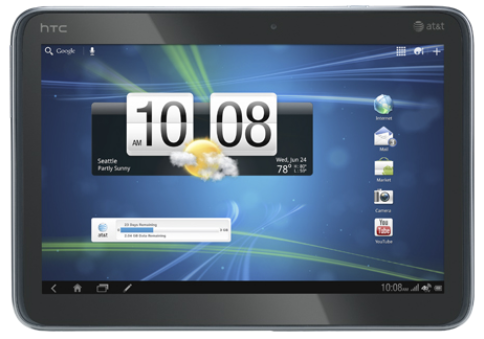
The HTC Jetstream was the first tablet with an 8MP camera.

Newer phones also have front-facing cameras which are used for video chat and other applications. For example, the Samsung Galaxy Nexus uses its front-facing camera to unlock the phone after it recognizes your face. Today, most front-facing cams are only 1.3 to 2.0 megapixels, but there are some exceptions — like the BlackBerry PlayBook, which has a 3MP front-facing camera.

Where are the Xenon Flashes?

The camera flash is another area which is improving. Some mobile devices have dual-LED flashes which put out more light than a single LED. A Xenon flash puts out even more light than a dual-LED flash. Although no smartphones have Xenon flashes today, a Xenon flash was first seen on a Sony Ericsson camera back in 2009.

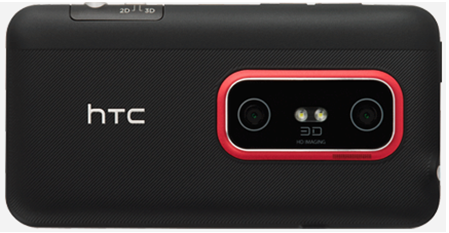
Phones like the HTC Evo 3D have dual-LED flashes

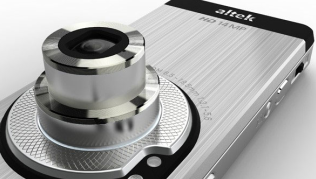
Face detection is another feature which is present on many newer camera phones. It ensures the selected face is in focus. What’s needed now is image stabilization and an optical zoom. Optical zoom is a must for both photos and video. That’s why it’s so surprising none of the popular smartphones available in the U.S. have it. A company called Altek has a 14-megapixel camera with a 3x optical zoom that could rival some point-and-shoot cameras.

Now that’s a lens!

Although 3D cameras may be a gimmick, they’re fun to play around with. Phones like the HTC EVO 3D can take 2-megapixel 3D photos today.

More than Megapixels

There’s evidence that megapixels alone aren’t the best indicator of photo quality. The iPhone 4 only has a 5-megapixel camera, but takes higher-quality photos than some Android phones with 8-megapixel cameras. One reason for this could be the fact it has a better lens. Let’s hope manufacturers pay attention to this important detail.

One of the most talked about features of the Galaxy Nexus and Android 4.0 is its lack of shutter lag. With this feature, you can take pictures as fast as you can touch the shutter button. Keep in mind this only works when auto-focus isn’t needed.

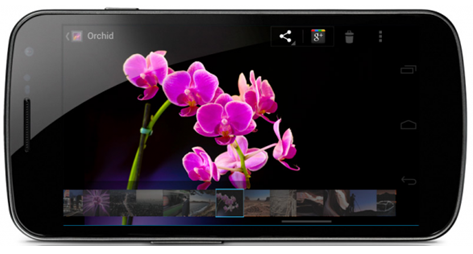
The Samsung Galaxy Nexus has a stellar light sensor and almost no shutter lag when taking photos in rapid succession.

Easy Panoramas for All

Although panorama apps have been available for years, this feature is now standard on all devices with Android 4.0. After panorama mode is enabled, you just need to press the shutter button while you pan to the left or right. When you’re done, the images are automatically stitched together. Now Anyone Can Take Great Looking Panorama Shots

Making Movies

Video recording is another area which can be improved in smartphones. The iPhone 4 records video at 720p, but displays it on a 640-pixel screen. The iPhone 4S and most of the new Android phone phones (e.g. HTC Rezound, Motorola Droid RAZR, all Samsung Galaxy phones) record video at 1080p. 3D video recording is improving as well. The HTC EVO 3D can record 3D 720p videos. In the not so distant future, phones and tablets will also support Dolby Digital.

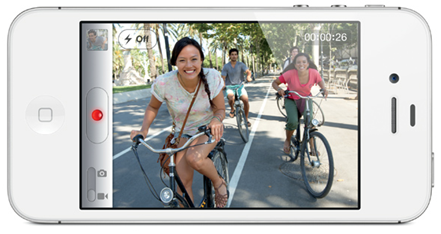
The iPhone 4S can now record 1080p video

Microphone quality is another area that can be enhanced. The Droid X’s camcorder has three microphones and four different audio recording modes.

Running Out of Space?

Storage can be a problem for those who take lots of pictures and movies. Some phones on have 16 or 32GB of storage and that’s not enough for some users. Expandable storage is available today on most Android devices, but many limit this to 32GB. Those who need more than this, should consider devices with hybrid or solid-state disk (SSD) drives which provide up to 250MB of storage. Because SSD drives have no moving parts, they are up to 2 to 5 times faster than conventional hard drives. Because these devices are larger, initially, they will only be available with tablets.

The Last Word

The cameras found in the best mobile devices take photos in good light which look surprisingly good. In some cases, they look similar to those taken with a point-and-shoot camera. Although a good DSLR still has it’s place, you can’t beat the convenience of camera phones and the quality of their photos continues to improve.

Thanks to @rossrubin for pointing out that camera phones with optical zooms are available in Japan.
Copyright 2011 Rick Schwartz. All rights reserved. Linking to this article is encouraged.

The Confusion Around Mobile Data Speeds

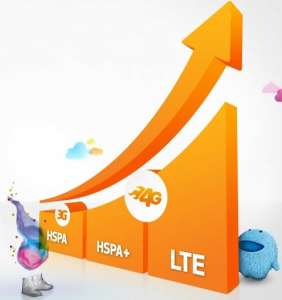
AT&T's marketing chart correctly places HSPA+ in-between 3G HSPA and LTE when it comes to data speeds.

The History of Faux G

Data speeds can have a huge impact on the perceived speed of your mobile device, but there is much confusion around 4G. For the past year all of the carriers have been running commercials about their 4G networks. Truth be told, until recently, Sprint and Verizon were the only U.S. carriers with true 4G networks and mobile devices to support it.

  • T-Mobile was first to call their HSPA+ network 4G and AT&T gave T-Moble grief over it. HSPA stands for “High Speed Packet Access.” Since then AT&T jumped on the same HSPA+ 4G bandwagon. HSPA+ is capable of speeds that are somewhere in-between 3G and 4G LTE. This is why some call it “Faux G.”
  • Sprint uses a different technology called WiMAX and was the first to deploy a true 4G network. Their network is capable of speeds that meet or exceed Verizon’s 4G data network. [Update: Sprint just announced they will be coming out with LTE phones in the 2nd half of 2012.]
  • Verizon launched their 4G LTE network back in December of 2010.
  • AT&T launched LTE in five cities in September 2011 (9 months after Verizon), but didn’t have a single 4G phone until November 2011.

If you’re fortunate to be in one of the 200+ cities with LTE coverage, you’re in for a real treat. LTE is much faster than 3G or HSPA+. How much faster? Verizon claims LTE speeds which are at least twice as fast as AT&T’s 4G HSPA+ and up to 12 times faster than their own 3G speeds. Most LTE users experience real world download speeds of 5 to 12 Mbps and real world upload speeds of 2 to 5 Mbps. These speeds are impressive, but they are conservative. I’ve experienced real world LTE download speeds as high as 45Mbps and upload speeds as high as 28Mbps. Theoretical peak LTE speeds are even higher than these. More info.

The Samsung Galaxy Nexus is on of the few phones with LTE and Dual-Band Wi-Fi support.

The list of smartphones which support LTE today include the Samsung Galaxy Nexus, BlackBerry Torch 9810, Droid Bionic, Droid Charge, Droid RAZR, HTC Rezound, HTC Thunderbolt, HTC Vivid, LG Revolution, Pantech Breakout, Samsung Galaxy S II HD LTE, Samsung Galaxy S II Skyrocket and Samsung Stratosphere. More phones are being added to this list every month. The list of tablets which support LTE today include the Motorola Xoom, Motorola Droid XYBOARD(8.2″ and 10.1″), Samsung Galaxy Tab 8.9, and Samsung Galaxy Tab 10.1. Why isn’t the iPhone 4S listed here? Unfortunately, LTE support isn’t yet available on the iPhone or iPad yet.

Trouble in Paradise?

There are two downsides with LTE that you should be aware of:

  1. LTE phones consume power faster than non-LTE phones. For this reason, in the past some people disable 4G when they weren’t using it. Fortunately most newer phones have more powerful batteries which make this less of an issue.
  2. LTE isn’t available everywhere, and even if you live in a city that has it, you may not always be able to get a 4G signal.

Wi-Fi data speeds are important as well. The best mobile devices support dual-band Wi-Fi. That means they work on both 2.4 GHz and 5.0 GHz Wi-Fi networks. 5.0 GHz networks are less crowded and capable of higher speeds. You can learn more about 5 GHz and view a list of devices which support it here. Some new mobile devices also include support for Bluetooth 4.0, which promises better range and lower energy consumption.

After reading this, you should be better prepared to evaluate the carriers confusing marketing messages about mobile data speeds. If data speeds are important to you, it’s essential all of your mobile devices support either LTE or WiMAX.

My next post will be about Rhapsody’s new cloud-based music service. You can read about that here.

Copyright 2011 Rick Schwartz. All rights reserved. Linking to this article is encouraged.

How to Evaluate Mobile Processors


Since this article was first written, an updated version has been posted here. Check it out. A lot has changed.

The Need for Speed

The HTC Rezound has a 1.5GHz processor making it one of the fastest smartphones

The processor is the engine behind your mobile device and determines its speed. Mobile processor speeds have been increasing quickly over the past few years. Today, most of the best smartphones have processors which are either 1.2GHz or 1.5GHz. The HTC Rezound and Samsung Galaxy S II HD LTE both have dual-core 1.5GHz processors. Processor speed isn’t the only thing that matters. The number of cores is important as well. Back in February, we saw the first smartphones ship with dual-core processors. Dual-core processors allow your mobile device to do more things at once without slowing down. They are also faster than single-core processors and this can result in a more responsive user interface. Over the next year, dual-core processor speeds are likely to top out around 1.7GHz. Although processor speeds will continue to increase, there are limits to how fast they can get. Mobile processors are beginning to face the same performance and power challenges desktop CPUs faced a few years ago. Demanding applications such as HD video playback and advanced gaming are stretching their capabilities. In order to further increase performance and stay within the available power limits, mobile devices will migrate to processors with more cores.

Apple iPhone 4S

HTC Rezound

HTC Titan

Motorola Droid RAZR

Samsung Galaxy S II

Samsung Galaxy Nexus

Samsung Galaxy S II Skyrocket

800MHz dual-core

1.5 GHz dual-core

1.5 GHz single-core

1.2 GHz dual-core

1.2 GHz dual-core

1.2 GHz dual-core

1.5 GHz dual-core

Chart 1: A comparison of the processor speeds of popular smartphones

Four Can Do More

Like PCs, mobile devices will migrate from dual-core to quad-core. Quad-core makes even more sense on platforms like Android which allows multiple apps to run in the background. Having four different cores allows your phone (or tablet) to do more at once without slowing down. Tablets will be the first mobile devices to get quad-core processors.  The NVIDIA Tegra 3 will be the first quad-core processor available on mobile devices. NVIDIA says it has 2 to 5 times the processing power and 3 times the graphic performance of the Tegra 2. This will result in smoother graphics and better gaming performance. The Tegra 3 is also capable of 1440p video playback. That’s higher quality than you can watch on your HDTV. The Asus Transformer Prime will be the first tablet to ship with a Tegra 3 processor, but rumors are also circulating about quad-core tablets from Motorola and others. Smartphones won’t be left out of the party; phones with quad-core chips will be announced at CES in January.

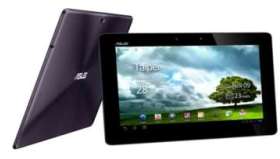
The Asus Transformer Prime will have the first quad-core CPU

Most quad-core processors are more efficient and generate less heat than today’s dual-core chips. That will result in better performance and longer battery life. How much longer? NVIDIA says a Tegra 3 tablet should be able to provide 12 hours of HD video playback.  The first quad-core processor will be 1.3GHz, but speeds will increase to 2.5GHz next year. Those chips will be faster than some of the CPUs that ship with mid-priced home computers today. Of course, NVIDIA isn’t the only company making quad-core processors, Qualcomm, Apple and others will also launch products containing quad-core processors next year.

Amazon Kindle Fire

Apple iPad 2

Asus Transformer Prime

B&N Nook Tablet

HTC Jetstream

Motorola Xoom 2

Samsung Galaxy Tab 10.1

1.0 GHz dual-core

1.0 GHz dual-core

1.3 GHz   quad-core

1.0 GHz dual-core

1.5 GHz dual-core

1.2 GHz dual-core

1.0 GHz dual-core

Chart 2: A comparison of the processor speeds of popular tablets
 

The Importance of the Graphics Co-processor

Some of the fastest phones have separate graphics co-processors, which can have a big impact on performance. Even though the iPhone 4S has a slower processor, it outperforms the Samsung Galaxy S II in some benchmarks. This occurs mainly because the iPhone 4S has a faster graphics coprocessor. See the chart below for details.

Even though the iPhone 4S has a much slower processor than the Samsung Galaxy II S, it outperforms it in some benchmarks. Chart courtesy of AnandTech


Final Thoughts

In summary, the speed of the CPU and GPU in your mobile device has a major impact on its performance. Dual-core processors almost always outperform single-core processors, and quad-core processors outperform dual-core processors. Although dual-core processor speeds are starting to slow down, quad-core speeds will improve substantially next year.  By the end of the year, quad-core processors will be found in most high-end tablets and smartphones due to their improved performance and extended battery life.

In case you’re wondering, my next post will discuss the importance of 4G on data performance speeds. Stay-tuned…

– Rick

Copyright 2011 Rick Schwartz. All rights reserved. Linking to this article is encouraged.

How to Evaluate Mobile Displays


Since this article was first written, an updated version has been posted here. Check it out. A lot has changed.

In my last blog post I talked about the best mobile devices on the market today. This will be the first in a new series of posts that will help you evaluate each part of a smartphone or tablet. Since the display is the main interface to your mobile device, let’s start with it.

Bigger is Better

Three main parameters are used to specify the size and quality of a mobile display:

  1. Screen size measured diagonally in inches
  2. Screen width and height in pixels
  3. Screen density measured in pixels per inch (PPI)

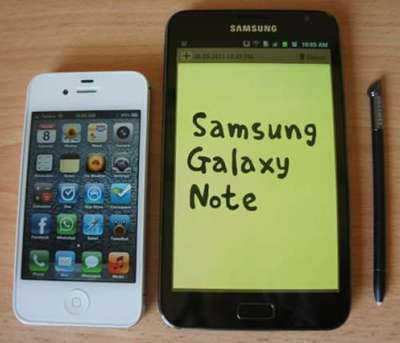
The Samsung Galaxy Note has a much larger screen than the iPhone 4S

Today’s best smartphones have displays which are 4.3″ or larger. The largest screen available on a smartphone in the U.S. today is 4.7″ and can be found on the HTC Titan. Think that’s big? It is, but mobile displays are going to continue to get larger. The Samsung Galaxy Note, which was recently released in Europe, has a 5.3″ screen.  As screens get 6″ or larger, the line between smartphones and tablets will begin to blur and these devices may no longer fit into your pocket. Is it worth it? If you spent lots of time browsing the Web, playing games or working with business documents the answer could be yes.

Screen Size

Pixels (H x W)

Screen Density

Apple iPhone 4S

3.5”

960×640

326 PPI

HTC EVO 3D

4.3”

960×540

256 PPI

HTC Rezound

4.3”

1280×720

342 PPI

HTC Titan

4.7”

800×480

199 PPI

Motorola Atrix

4.0”

960×540

275 PPI

Motorola Droid 2

3.7”

854×480

264 PPI

Motorola Razr

4.3”

960×540

256 PPI

Samsung Galaxy S II

4.3” or 4.52”

800×480

217 PPI

Samsung Galaxy Nexus

4.65”

1280×720

316 PPI

Samsung Galaxy Note

5.3”

1280×800

285 PPI

Chart 1: A comparison of popular smartphone displays

Quality Matters Too!

The HTC Rezound has the highest resolution display available today.

Screen width and height is another popular measurement. Today the best smartphones have 1280×720 pixel displays. The Samsung Galaxy Note has an even larger 1280×800 display. Although the total number of pixels is important, it’s not the best indicator of screen quality. The density of pixels is what really matters.  The higher the pixel density, the more detail a screen can display. Although most people think the iPhone 4S has the highest pixel density, they are wrong. The HTC Rezound has a display with a higher pixel density than the iPhone 4S (342 vs. 326 ppi). Even better screens are on the way. Earlier in the year, Toshiba announced a 4-inch screen with a 367 PPI resolution. Pixel densities are likely to hit at least 386 in 2012.

It’s worth mentioning there is some debate over the ideal pixel density. Steve Jobs once said a device with a pixel density of 300 exceeds the limits of the human retina. However, some photographic experts say that number is too low. They believe the ultimate pixel density is 477 PPI. At that point, it’s said the pixels become invisible to an unaided human eye.

What About Tablets?

Screen resolution is one area where tablets can improve. The best tablets have screen densities below 200 while some smartphones have pixel densities higher than 300. Apple is known for their great displays. How does the iPad 2 compare to Android tablets? Let’s see: The iPad 2 has a 9.7″ screen with 1024×768 pixels. The Motorola Xoom has a 10.1″ screen with 1280×800 pixels. Which is better? The Motorola wins on all three categories: screen size, total number of pixels and screen density (with a pixel density of 160 PPI vs. 132 PPI). If you refer to the chart below, you’ll see there are five other Android tablets with even higher screen densities than the Motorola Xoom. Will we see higher resolution tablet screens next year? Definitely! The Lenovo LePad S2007 will have a 216 PPI display and tablets with 2560×1600 screens will be available some time in 2012. These tablets will have a screen density of at least 300 dpi.

Screen Size

Pixels (W x H)

Screen Density

Amazon Kindle Fire

7.0″

1024×600

169 PPI

Apple iPad 2

9.7″

1024×768

132 PPI

Asus Transformer

10.1″

1280×800

160 PPI

Asus Transformer Prime

10.1″

1280×800

149 PPI

B&N Nook Tablet

7.0″

1024×600

169 PPI

Motorola Droid XYBOARD 8.2

8.2″

1280×800

184 PPI

Motorola Xoom

10.1″

1280×800

160 PPI

OGT Eros Tablet

7.0″

N/A

188 PPI

Samsung Galaxy Tab 7.0

7.0″

1024×600

171 PPI

Samsung Galaxy Tab 10.1

10.1″

1280×800

149 PPI

Chart 2: A comparison of popular tablet displays

That’s Not All

Of course pixel density isn’t the only thing that matters when it comes to screen quality. The color accuracy, color vibrancy, brightness, contrast ratio, black level and viewing angle are important as well. The durability also matters. Gorilla Glass screens are more damage resistant than regular displays. Gorilla Glass 2 screens are on the way, so watch for those.

Well, that wraps up my review of mobile screen technology. In my next post, I’ll write about the heart of every mobile device: Its processor.

Thanks for stopping by.

– Rick

Copyright 2011 Rick Schwartz. All rights reserved. Linking to this article is encouraged.

The Ultimate Mobile Device (Updated Feb.)


Since this article was first written, an updated version has been posted here. Check it out. A lot has changed.

Although there are lots of great mobile devices available today, there is no one single device that is best at everything. It is possible to say which phone (or tablet) has the best display, processor and so on. After reading this article, you should be better prepared to purchase the ultimate mobile device based on your needs.

Best Mobile Display

Since the screen is the main interface to your mobile device, it’s very important. Although the size and total number of pixels matters, it’s the pixel density which determines the amount of detail you’ll see. More info.

The Galaxy Note is the the only smartphone with a 5.3" display

  • First place: The HTC Rezound has a 4.3” screen with 1280×720 pixels and a higher pixel density than the iPhone 4S (342 ppi vs. 326 ppi). The Windows Phone Lumia 900 is the most readable under bright light. More info.
  • Runner-up: The Samsung Galaxy Note has the largest screen you’ll find on a smartphone today. It’s an amazing 5.3” and has a record setting 1280×800 pixels. The reason it doesn’t come in first is because its pixel density is lower than the HTC Rezound. When it comes to tablets, the Samsung Galaxy series have some of the best displays available today, and pixel densities which are almost 30% higher than the iPad 2.
  • What to look for: A tablet with a 2560×1600 pixel screen will be available in 2012. Smartphones will get screens with pixel densities near 400 ppi as well. Also expect to see displays with polarized filters, that make screens more visible in direct sunlight.

Best Mobile Processor

The processor in your mobile device determines how fast your apps will run. Today’s best mobile devices have multi-core processors, which allow your device to do several things at once without slowing down. More info.

The Asus Transformer Prime was the first quad-core powered mobile device

  • First place: The ASUS Transformer Prime has an NVIDIA Tegra 3 quad-core processor which out performs every mobile device on the market today in most benchmarks.
  • Runner-up: The HTC Rezound, LG Nitro HD and Samsung Galaxy S II Skyrocket all have 1.5GHz dual-core processors. The HTC Jetstream tablet also has a 1.5GHz dual-core processor.
  • What to look for: Quite a few quad-core smartphones will be announced in Q1. Dual-core CPUs in smartphones will hit speeds of 1.8 GHz in 2012. Tablet processors will hit speeds of 2GHz in 2012, and could go as high as 2.5GHz.

Fastest Data Speeds

4G LTE devices are at least 5-10x faster than 3G devices

Data speeds have a significant impact on the perceived speed of your mobile device. Verizon claims 4G LTE speeds that are at least twice as fast as AT&T’s 4G HSPA+ phones and up to 12 times faster than 3G speeds. More info.

  • First place: LTE phones like the Samsung Galaxy Nexus and Galaxy S II HD LTE win because they work on LTE networks and support both 2.5GHz and 5.0GHz Wi-Fi.
  • Runner-up: The HTC Rezound, Motorola Droid RAZR, Motorola Xoom, Samsung Galaxy Tab 10.1, HTC  Jetstream and all other mobile devices which support LTE or WiMAX.
  • What to look for: Expect Apple’s iPhone to finally get LTE support in 2012.

Best Camera

Today’s best mobile devices have 8 megapixel rear cameras which are capable of taking surprisingly good-looking photos. Most have LED flashes and front-facing cameras for video conferencing.

The HTC Titan II will be the first phone with a 16MP camera

  • First place: Too close to call. The 12MP Nokia N8 wins on specs with its Carl Zeiss optics and a xenon flash, but it’s on a Symbian phone which is more than a year old. When it comes to smartphones with 8MP cameras, the iPhone 4S, HTC Amaze, HTC Sensation, HTC Titan, Samsung Galaxy S II and T-Mobile MyTouch Slide all take photos which rival some point-and-shoot cameras. The Samsung Galaxy 10.1V tablet comes in first because of its 8MP camera. Unfortunately, this model is only available in Europe.
  • Runner-up: The Samsung Galaxy Nexus has a stellar light sensor and almost no shutter lag when taking photos in rapid succession. The BlackBerry PlayBook and HTC Flyer also deserve recognition because they have 3-MP front-facing cameras.
  • What to look for: The HTC Titan II will be released in March with the first 16-megapixel camera! Fujitsu is also releasing a 13.1MP camera capable of ISO 25,600. Expect to see a camera with a xenon flash and optical zoom later this year as well. Future tablets will also be capable of 1440p video playback.

Most Internal Storage

The Archos 70 has 250GB of storage

Today most mobile devices have only 16 or 32 MB of internal storage. Unfortunately that is not enough storage for a large media library.

  • First place: The Archos 70 tablet has an internal 250GB hard drive.
  • Runner-up:  The Apple iPhone 4S, Nokia N8 and Nokia N9 are all available with 64GB of internal storage.
  • What to look for:  Expect to see more tablets which have lightning-fast solid-state drives like the Asus Eee Slate.

Most Powerful Battery

Today’s fastest mobile devices require more power than ever. Especially those with high processor speeds and power-hungry LTE radios. That’s why we’re seeing mobile devices with more powerful batteries.

The HTC Jetstream has a 7300 mAh battery

  • First place: The HTC Jetstream has a 7300 mAh battery, which is the most powerful battery available in a stock mobile device today.
  • Runner-up:  Samsung Galaxy Tab 10.1 (7000 mAh). The Droid RAZR Maxx has the most powerful battery in a smartphone today. At 3300mAh, this phone has a talk time of 21.5 hours and a standby time of approx. 15.8 days.
  • What to look for in the near future:  Expect to see even more powerful batteries in mobile devices, and the ability to add a second battery to some tablets.

Thinnest Case

Today’s best mobile devices are incredibly thin and light.

The Droid Razr is the World's Thinnest LTE Smartphone

  • First place: The 6.68mm Huawei Ascend P1S is technically now the world’s thinnest smartphone. It’s effectively tied with the Fujitsu Arrows F-07D which comes in at 6.7mm. Too bad neither phone is available in the U.S. and both don’t support LTE. The 7.1mm Motorola Droid RAZR is the thinnest LTE smartphone. The 7.0mm OGT Eros is supposed to be the world’s thinnest tablet but it has yet to be released.
  • Runner-up:  The 8.3 mm ASUS Transformer Prime is the thinnest tablet available in the U.S today.
  • What to look for in future cases:  Expect to see more mobile devices which can be submerged in water. Fujitsu’s new quad-core phone can be submerged 1.5 meters for up to 30 minutes.

The Final Word

It’s a given that technology will always get better over time, but we’ve seen unprecedented improvements in mobile devices over the past year. Today’s best smartphones blow away some of those which were released earlier. If you’re eligible for an upgrade, you should consider some of the devices covered in this article. As you can see, there isn’t a single mobile device that is best at everything. You should pick your next smartphone or tablet based on the things which matter most to you.

Update: Since this article was last updated, a chart listing the best smartphones was published here.

Copyright 2011-2012 Rick Schwartz. All rights reserved. Linking to this article is encouraged.